

A cellular connection can be active and authenticated while a gap remains between the SIM, device, network, and the team monitoring them. A practical cellular iot security checklist covers all four, not just the device.
That’s a familiar challenge for IoT teams. Security responsibilities often span device engineering, carrier management, platform owners, and operations. Across a large deployment, SIM misuse or an unexpected device change can be difficult to spot. Generic IoT guidance may also overlook cellular-specific controls.
This guide gives you a structured way to assess security across the full lifecycle. Review device identity and configuration, SIM access and usage, network controls, platform visibility, and operational response. For each check, identify a clear owner, define the evidence that demonstrates the control is working, and record any follow-up action.
Centralized connectivity management can support ongoing oversight. CAMP™ provides real-time visibility into devices, SIMs, and data usage, along with SIM locking and device-change alerts to help teams detect and manage unauthorized use. These controls are one layer in a broader security program, not a substitute for securing devices, applications, or networks.
Key Takeaways
- Use a cellular iot security checklist to assess endpoint, SIM, network, and management-plane controls, then identify gaps between them.
- Review device configuration and identity alongside connectivity. A private network path alone can’t protect a vulnerable endpoint.
- Make each check actionable by recording its owner, evidence, status, and remediation step.
- Use SIM locking, device-change alerts, and real-time connectivity visibility to strengthen ongoing oversight within a broader security program.
Why a Cellular IoT Security Checklist Must Cover More Than Connectivity
A device can connect successfully and still be exposed through weak configuration, vulnerable software, or stolen credentials. Cellular IoT security requires coordinated controls across the endpoint, SIM, network path, platform, applications, and the teams that manage them. Each layer protects a different boundary. A gap between layers can leave an otherwise well-connected deployment at risk.
A cellular iot security checklist is a structured way to verify controls across devices, SIMs, networks, platforms, and operations, with a clear owner and evidence for each check.
Which assets and trust boundaries belong in scope?
Start by inventorying devices, SIMs, applications, management platforms, and the data they exchange. Map the communication path from each device to the cellular network, then onward to cloud services or business systems. This Internet of Things (IoT) overview and security concerns provides useful context for how connected products and networks intersect. Mark where data crosses organizational or technical boundaries.
Assign an owner to each boundary. A provider may manage connectivity, an integrator may configure the deployment, and the customer may own device policy, applications, or data. Record who approves changes and who responds to alerts. Make shared responsibilities explicit so an alert or open security task doesn’t fall between teams.
What cellular-specific risks should teams consider?
Assess whether a SIM could be stolen, moved to an unauthorized device, or used in a way that differs from its expected pattern. Review exposed interfaces, weak device settings, and compromised credentials as well. These risks can cross team boundaries: a connectivity team may see an unusual SIM event, while the device or application owner may need to investigate the software or account involved.
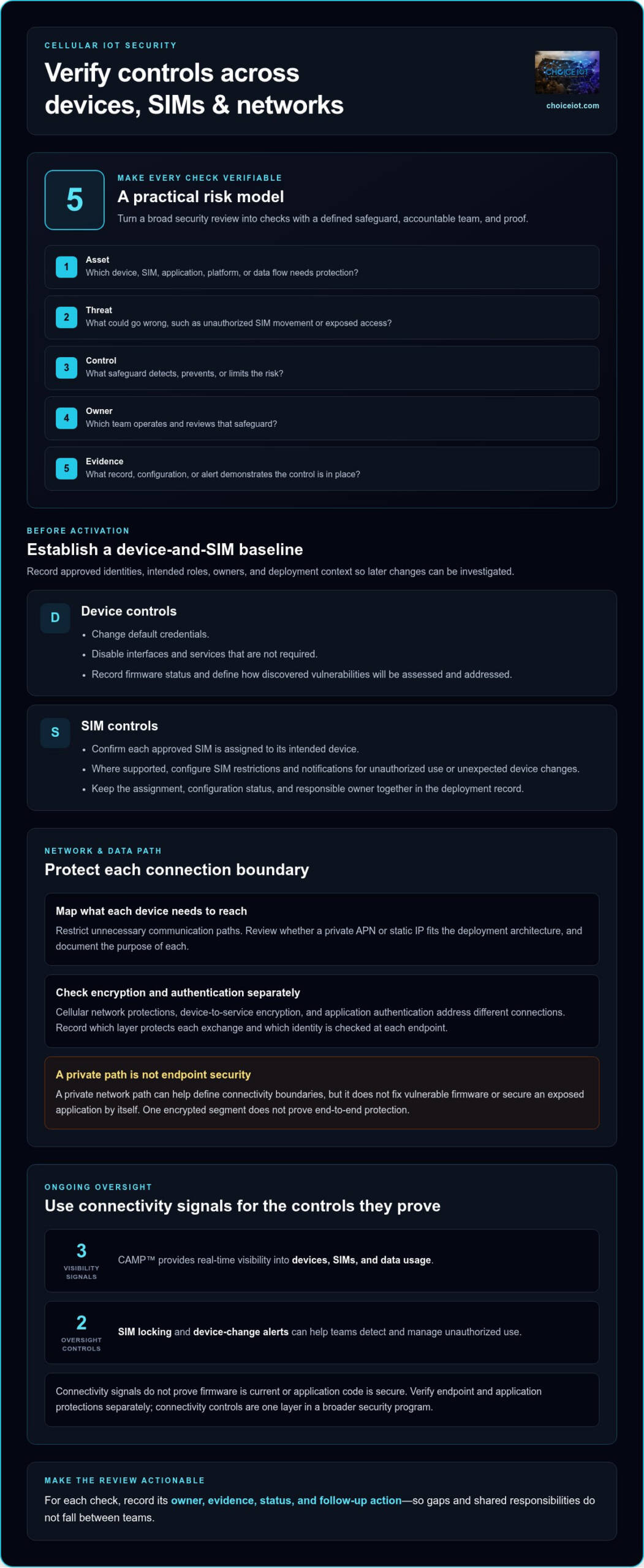
Keep connectivity signals in perspective. A platform may show SIM status, device changes, and data usage, but those signals don’t prove that firmware is current or application code is secure. Use connectivity monitoring as evidence for connectivity controls, then verify endpoint and application protections separately.
Use a simple risk model to make each checklist item actionable:
- Asset: What device, SIM, application, platform, or data flow needs protection?
- Threat: What could go wrong, such as unauthorized SIM movement or exposed access?
- Control: What safeguard detects, prevents, or limits the risk?
- Owner: Which team is accountable for operating and reviewing that safeguard?
- Evidence: What record, configuration, or alert demonstrates that the control is in place?
This structure turns a broad security review into verifiable checks. It also highlights risks with no assigned owner and cases where teams treat connectivity data as proof of a different control.
Cellular IoT Security Checklist: Verify Device, SIM, and Network Controls
Assess endpoints, SIMs, network paths, and the management plane separately. Clear categories make ownership easier to assign and help prevent a control in one layer from being mistaken for protection across the deployment. No single cellular control secures an entire IoT deployment. Protection depends on safeguards working together across every layer.
Device and SIM checks before activation
Before connecting a device, establish its identity and intended role. Assign each approved SIM to its intended device and record the owner and deployment context. This baseline gives teams a reference for investigating changes later.
- Device: Change default credentials, disable interfaces and services that aren’t required, and record firmware status. Define how the responsible team will assess and address discovered vulnerabilities.
- SIM: Confirm the approved SIM-to-device assignment. Where supported, configure SIM restrictions and notifications for unauthorized use or unexpected device changes.
- Evidence: Keep the device and SIM assignment, configuration status, and responsible owner together in the deployment record.
These checks make it easier to distinguish an approved device change from an unexpected one. They also help route an alert to the team equipped to investigate it.
Network and data-path checks
Map the systems each device needs to reach, then restrict unnecessary communication paths. Review whether a private APN or static IP fits the deployment architecture, and document the purpose of each. A private network path can help define connectivity boundaries, but it doesn’t fix vulnerable firmware or secure an exposed application by itself.
Check encryption and authentication at the relevant points in the data path. Cellular network protections, device-to-service encryption, and application authentication address different connections. Record which layer protects each exchange and which identity is checked at each endpoint. Don’t assume that one encrypted segment provides end-to-end protection.
For network-path planning, use the private APN for IoT connectivity guidance to consider how a private APN relates to the systems devices need to reach. Treat the result as one part of the wider control set.
Make the cellular iot security checklist practical by recording the control, owner, and evidence for each layer. Choice IoT’s SIM and connectivity management supports centralized SIM visibility, device-change alerts, and SIM locking to an authorized device. These controls complement, but don’t replace, endpoint and application security.
How to Apply the Cellular IoT Security Checklist Across a Deployment
Turn each security expectation into a tracked control by applying the checklist through five stages: discovery, baseline, rollout, monitoring, and response. This sequence creates a repeatable process, not a priority ranking. Address the gaps that pose the greatest exposure or business impact first, such as an unowned SIM or an alert that no team reviews.
Build a deployment-ready control register
During discovery, identify assets and accountable teams. At baseline, record expected configurations and evidence. During rollout, track whether controls are implemented and resolve failed checks before devices go live or as they are deployed, based on risk. Keep the register useful for audits and daily operations, not just project launch.
- Identify: Record the asset identifier, SIM identifier, assigned device, deployment context, and accountable team.
- Evidence: Reference configuration records, test results, or relevant platform reports. Don’t store credentials, keys, or other secrets in the register.
- Track: Mark each check as passed, failed, not applicable, or awaiting remediation. Give every open gap a named owner, remediation action, and target review date.
Reusable audit format: Asset and SIM identifiers | control | owner | evidence reference | status | remediation action | target review date. This gives reviewers a consistent record without exposing sensitive access details.
Monitor changes and rehearse incident response
Monitor for meaningful deviations from the approved baseline. Decide how teams will review unusual usage, device changes, and unexpected connectivity behavior, then link each alert to an investigation and escalation path. The cellular iot security checklist stays current when changes trigger a fresh review.
Document the response to suspected SIM misuse, including who can investigate, who can authorize suspension, and how affected teams are notified. Test the escalation path with an exercise, record what worked and what stalled, and update the runbook. Repeat the review after device, carrier, application, or deployment changes, and after incidents.
Connectivity architecture shapes which SIM and network controls can be applied consistently across a fleet. Explore multi-carrier IoT SIM connectivity options as you plan that layer, then document how the design fits your deployment’s control register.
Keep Cellular IoT Security Visible with Ongoing SIM Management
Security checks need to stay active after deployment. Connectivity management helps teams monitor SIM activity and act on relevant signals, but it doesn’t replace device hardening, application security, or network protections. Treat it as an operational layer in the broader cellular iot security checklist, with defined owners and response steps.
Where CAMP™ fits in the security workflow
CAMP™ brings SIM controls and connectivity visibility into one management workflow. SIM Lock & Security can lock a SIM to an authorized device and alert or suspend on unauthorized use. Device Change Alerts notify teams when a SIM moves to another device, prompting an investigation into whether the change was approved.
Real-Time Visibility lets teams review device, SIM, and data-usage information together. This context can help operations teams spot a mismatch between an approved assignment and current activity. It’s useful evidence for connectivity oversight, not proof that device software or applications are secure.
Turn visibility into repeatable operational action
Visibility is most useful when teams know what to do next. Set data-usage thresholds with Intelligent Alerts so relevant changes prompt review. During an investigation, Diagnostics & Troubleshooting can support connectivity checks, while support-note history helps retain context for follow-up. Reporting & Analytics provides usage, cost, and performance information for routine oversight.
For repeatable SIM operations, Automation & API can support SIM activations, suspensions, and plan changes. Define which actions are suitable for automation and which need review or approval. Keep the response process clear: identify the alert, assign an owner, investigate the cause, and record the outcome. Platform visibility supports that workflow, but endpoint and network safeguards remain necessary.
Teams shaping their wider approach can use an IoT connectivity management platform strategic guide to frame platform requirements around visibility, operational controls, and integration with existing processes.
Bring SIM oversight into your security workflow with Choice IoT’s Multi-Carrier IoT SIM and CAMP™ platform, designed to support connectivity management across your deployment.
Make Your Next Security Review More Actionable
Use your cellular iot security checklist as a living operations tool, not a document that stops changing once devices are deployed. Set a review rhythm, update owners when responsibilities shift, and turn unresolved findings into specific next steps. This keeps security decisions connected to how your deployment operates.
Connectivity oversight can support that work. CAMP™ offers SIM Lock & Security and Device Change Alerts, alongside real-time visibility across devices, SIMs, and data usage. Use these signals to strengthen SIM-related checks while keeping endpoint, application, and network protections with their respective owners.
Ready to align SIM management with your deployment’s security workflow? Talk with Choice IoT about managing cellular IoT connectivity. A clearer view of connectivity responsibilities is a practical step toward a more manageable security program.
Frequently Asked Questions
Does a multi-carrier IoT SIM automatically make a deployment secure?
No. A multi-carrier IoT SIM can support connectivity planning, but it doesn’t secure device software, credentials, applications, or data on its own. Before rollout, test a representative device against its intended workflow. Verify its SIM assignment, review the services it exposes, and map the destinations it needs to reach. Treat carrier selection as one architecture decision, not proof that the complete deployment has passed a security review.
Can a private APN prevent every cellular IoT security threat?
No. A private APN can support network isolation and traffic-control goals, but it can’t correct a compromised device or an insecure application. Trace a device’s full route, including the services it contacts beyond the cellular connection. Check that each endpoint authenticates devices appropriately and that sensitive data is protected in transit. Use the APN as one network measure, alongside device safeguards and an incident response plan.
What should a team do if an IoT SIM appears to have moved devices?
Investigate the change before deciding whether it indicates compromise. Compare the alert with the approved device-to-SIM record, then check whether maintenance, replacement, or another authorized action explains it. Review related connectivity activity and involve the team responsible for the device. If the activity remains unexplained, follow your incident process to restrict or suspend the SIM when warranted. Record the decision and update the asset record after resolution.
How often should businesses review a cellular IoT security checklist?
Set a recurring review schedule based on deployment risk, then review sooner after meaningful changes. A device replacement, network redesign, application update, or supplier change can alter assumptions in the cellular iot security checklist. Review alerts and open remediation items on the established schedule, too. Assign an owner to each action and track it to closure. This keeps the checklist useful as the deployment evolves, rather than limiting it to pre-launch sign-off.
Is cellular IoT more secure than Wi-Fi for connected devices?
Neither connection type is automatically secure. Compare the actual architecture: where devices operate, which systems they need to reach, how identities are verified, and how data is protected and monitored. Cellular deployments also require attention to SIM assignments and changes; Wi-Fi deployments have their own access and network considerations. Choose based on the use case, then secure the device and services regardless of access technology.
What evidence should an IoT security checklist retain?
Keep records that let a reviewer verify what was configured and when, such as approved assignments, configuration versions, alert settings, review dates, and remediation outcomes. Include enough context to identify the asset and responsible owner, but never put passwords, private keys, or other secrets in a general audit file. Store evidence with appropriate access controls, and note its source and collection date so later reviews can interpret it accurately.