

What if a smart city’s connectivity plan falls short because it relies on one network for every device? Sensors in streets, utility sites, and public buildings face different coverage, power, and data needs. Smart city IoT connectivity infrastructure must account for those differences from the start.
That means planning more than network access. Security, resilience, and ongoing device visibility matter too, especially as deployments span locations and services. Match connectivity to each use case, then decide how teams will monitor and manage connections over time.
This guide explains the connectivity layers that support smart city services and offers a practical way to plan around real-world requirements. You’ll learn how cellular and fixed wireless options can fit different locations, when Private APN and Static IP may be relevant, and how centralized management can simplify operations. You’ll also see how CAMP™ brings SIM and usage visibility, alerts, diagnostics, and reporting into one dashboard. Use these considerations to balance coverage, security, and manageability as connected systems grow.
Key Takeaways
- Separate connectivity from city devices, data platforms, applications, and public services to clarify what your deployment needs.
- Trace how data moves from each endpoint through a network to the systems that process it and support action.
- Plan smart city iot connectivity infrastructure around each use case, device requirements, location, security, and ongoing operations.
- Do not assume one connectivity technology will suit every location and urban application.
- Choice IoT connectivity options and CAMP™ management capabilities support connectivity visibility and operational workflows within a wider city architecture.
What Smart City IoT Connectivity Infrastructure Includes
Smart city IoT connectivity infrastructure is the layer that moves data between urban devices, communication networks, management systems, and applications. In plain terms, it connects city devices to the systems that make their data useful.
It is one part of a wider smart city architecture. Sensors and endpoints collect readings, while physical assets such as streetlights, vehicles, and utility equipment provide places for devices to operate. City applications use the data to support traffic monitoring, environmental sensing, utility operations, or public-space management. Connectivity carries information between these components, but it is not the sensor, application, asset, or public service itself. The broader Smart city concept brings technology and data together across many urban functions.
Which layers connect smart city devices to useful data?
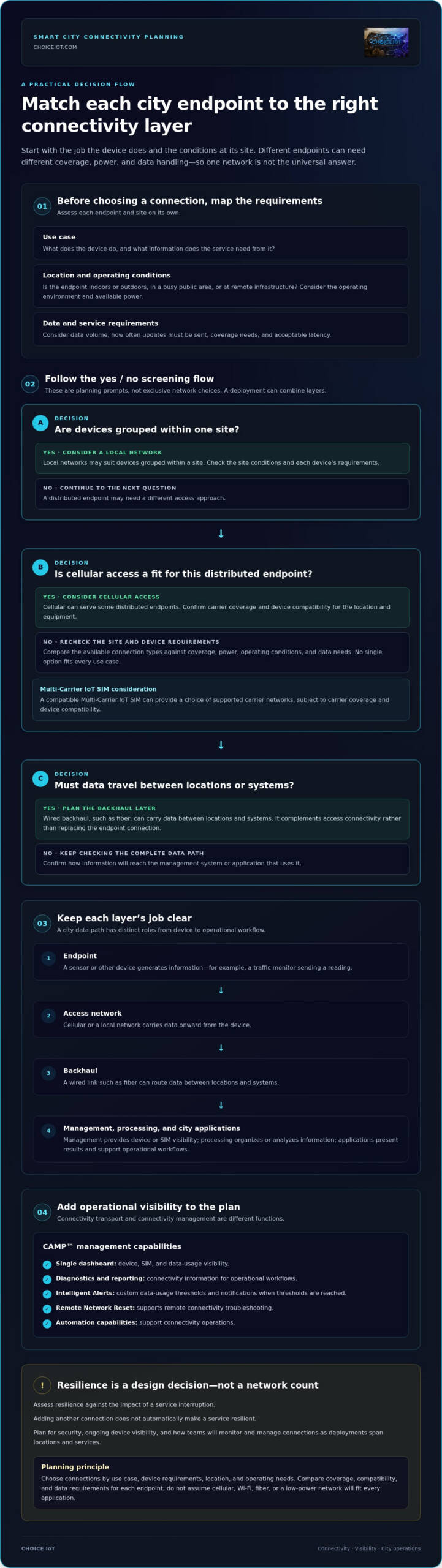
A typical data path starts at an endpoint, such as an environmental sensor. The device sends information over an access network, which may be cellular or a local network. Data may then travel over wired backhaul, such as fiber, to a management system or application. Each layer has a distinct role: connectivity transports data, device-management tools provide visibility and control, processing systems interpret or organize information, and city applications turn it into operational workflows.
Requirements vary by use case. A traffic-monitoring device and a utility sensor may differ in data volume, coverage needs, power access, and acceptable latency. For example, a device that sends periodic readings has different connectivity requirements from one that needs to transmit updates more frequently. Those differences shape the device and network choices.
Why do smart city projects use more than one connectivity approach?
Urban deployments span indoor and outdoor sites, busy public areas, and remote infrastructure. A device’s location, available power, operating environment, and data needs all affect which connection makes sense. Cellular access can serve some distributed endpoints. Local networks may suit devices grouped within a site, while wired links can provide backhaul between locations and systems.
No single option, whether cellular, Wi-Fi, fiber, or a low-power network, is the universal answer for every city use case. Start by listing the conditions at each site and the data each device needs to send. Then choose suitable connections and plan how they will fit together. For a broader planning framework, see the scalable IoT connectivity strategy guide.
How Smart City IoT Connectivity Moves Data Across Networks
Consider a traffic monitor sending a reading from a roadside device. The endpoint generates data, an access network carries it onward, and backhaul routes it to a platform or application. From there, a monitoring workflow can display the reading or help inform an operational response. Smart city iot connectivity infrastructure handles transport, but it is not the same as managing devices, processing data, or running city applications.
Each layer has a distinct job. Connectivity moves information. Device management provides visibility into device or SIM status. Data processing organizes or analyzes information. City applications present results and support workflows. Keeping these functions clear makes it easier to identify where a deployment needs better network access, operational visibility, or application integration. Reference frameworks such as the IEEE Standards for Smart Cities can help teams consider how technical standards fit into broader smart city systems.
Network selection depends on what a device does, where it operates, and how its data must reach the systems that use it. A fixed endpoint sending occasional readings may have different requirements from a mobile device or a system transmitting more frequent updates. Compare coverage, device compatibility, data needs, and deployment conditions for each use case. No network type is automatically best for every application.
How do cellular IoT SIMs support distributed deployments?
A cellular IoT SIM gives a compatible device access to supported carrier networks. For distributed devices, a Multi-Carrier IoT SIM can provide a choice of supported carrier networks, subject to carrier coverage and device compatibility. It is one part of the data path, not a substitute for backhaul, platforms, or applications. Explore the multi-carrier IoT SIM guide for more on SIM architecture.
Where do connectivity management platforms fit?
A management platform helps operators see and act on connectivity information across a deployment. CAMP™ provides a single dashboard for device, SIM, and data-usage visibility, alongside diagnostics, reporting, and automation capabilities. Use Intelligent Alerts to set custom data-usage thresholds and notify teams when those thresholds are reached. Remote Network Reset supports remote connectivity troubleshooting. These features help teams turn connectivity records into practical operational workflows. See the IoT connectivity management platform guide for more platform detail, or explore Choice IoT connectivity management.
How to Plan Resilient and Secure Smart City IoT Connectivity
A reliable plan starts with service requirements, not a preferred network technology. No single option will suit every endpoint, location, or operating condition. Treat resilience as a design goal and assess it against the impact of a service interruption. Adding another connection does not automatically make a service resilient.
Before selecting connectivity, document the use case, device behavior, location, data pattern, coverage needs, security controls, operational owner, and validation criteria.
- Define the use case. Specify what the connected service must do, how often it needs data, and the operational impact if information is delayed or unavailable. This helps distinguish routine monitoring from services where interruptions have greater consequences.
- Record device requirements. Identify endpoint location and movement, power access, expected data volume, communication frequency, and device compatibility. These details narrow the options worth assessing.
- Map coverage, capacity, and continuity. Plot device locations and operating conditions. Consider where cellular, Fixed Wireless Connectivity, wired backhaul, or other approaches may fit. Document fallback expectations based on service criticality, then test actual deployment conditions rather than assuming coverage is uniform.
- Set security controls. Define device authorization, access permissions, and monitoring requirements. SIM Lock & Security supports SIM-level safeguards. A Private APN may fit a deployment’s private-network design, while a Static IP Address can support specific addressing requirements. Neither replaces broader access controls or monitoring. See the Private APN for IoT guide for more detail.
- Plan ongoing operations. Decide how teams will track connectivity status, usage, alerts, and troubleshooting across deployed devices. Set out who reviews alerts and what steps follow when a device or SIM needs attention.
- Validate before scaling. Test selected devices and connections in representative locations. Check that data reaches the intended systems, security controls work as designed, and documented fallback expectations are understood.
This process makes smart city iot connectivity infrastructure a considered part of service design, rather than a network choice made in isolation. Choice IoT provides connectivity and management capabilities for this layer. Explore Choice IoT connectivity options.
How Choice IoT Supports Smart City Connectivity Operations
Choice IoT provides connectivity and operational management for the SIMs and connections that link distributed devices to wider city systems. Its connectivity options and CAMP™ IoT Platform fit within a broader architecture that also includes sensors, city applications, and public services.
The right combination depends on the deployment. Multi-Carrier IoT SIMs provide a choice of supported carrier networks for compatible devices. Fixed Wireless Connectivity can serve other project requirements. 5G Redcap may be relevant when its connectivity characteristics align with device and use-case needs. Choose options based on site conditions, device compatibility, and the data each application needs to move.
Which CAMP™ capabilities support day-to-day fleet operations?
Managing distributed SIMs one by one can make routine oversight harder. CAMP™ brings device, SIM, and data-usage visibility into a single dashboard, helping teams review connectivity status and operational information in one place.
- Real-Time Visibility gives teams a single dashboard for devices, SIMs, and data usage.
- Intelligent Alerts let teams set custom data-usage thresholds and receive proactive notifications.
- Reporting & Analytics provides detailed usage, cost, and performance reports that teams can export for review.
- Diagnostics & Troubleshooting provides built-in tools for investigating connectivity issues and a history of support notes. Remote Network Reset lets teams reset SIM connectivity remotely, without an on-site visit for that action.
- SIM Lock & Security helps lock each SIM to an authorized device, with automatic alerts or suspension. Device Change Alerts notify teams when a SIM is moved to a different device.
Together, these capabilities reduce manual SIM administration and make connectivity activity easier to track. Teams can use CAMP™ to review usage, investigate issues, and follow up on alerts through their existing operational workflows.
How can teams scale connectivity workflows over time?
As deployments expand, recurring SIM tasks can become part of broader operational processes. CAMP™ Automation & API supports SIM activations, suspensions, and plan changes, as well as integration with CRM or ERP systems. This can align connectivity administration with existing business processes and reduce repetitive manual work.
Start by documenting use cases, device and connectivity requirements, security needs, and the workflows teams must manage. Then match platform capabilities to those needs as you plan smart city iot connectivity infrastructure. Explore Choice IoT connectivity solutions.
Build a Connectivity Plan That Can Grow With Your City
Strong smart city IoT connectivity infrastructure starts with the work each device needs to do, not an assumption that one network can serve every location. Match connectivity to device behavior, coverage, security, and service priorities. Then decide how teams will monitor and manage connections as deployments expand.
Centralized operations matter as much as network access. CAMP™ brings device and SIM visibility, alerts, diagnostics, and reporting into one dashboard. Remote Network Reset supports remote connectivity troubleshooting, while Automation & API can connect recurring workflows with business systems. Use the capabilities that fit your deployment and operational needs.
Ready to shape the connectivity layer for your project? Explore Choice IoT connectivity solutions and match the available options to your requirements. A clear plan and the right operational tools help your team manage connected systems with greater visibility.
Frequently Asked Questions
What is smart city IoT connectivity infrastructure?
Smart city IoT connectivity infrastructure is the network layer that carries data between connected urban devices, communication networks, management systems, and applications. It links endpoints to systems that use their data, but it is not the sensors, physical assets, or city services themselves. For example, a roadside monitor may send readings over a network to a system used by city staff. Start planning by matching connectivity to each device’s location, data needs, and operational role.
How does IoT connectivity work in a smart city?
IoT connectivity moves data from an endpoint to the systems that need it. A device collects information, such as a utility reading, then sends it through an access network and possibly wired backhaul to a platform or application. Connectivity transports the data; management tools track device or SIM status; processing systems organize or analyze information; and city applications support monitoring or operational workflows. Each layer has a distinct function.
Which connectivity technologies are used in smart city projects?
Smart city projects can use cellular, Wi-Fi or other local networks, fixed wireless, wired connections such as fiber, and low-power networks. The right mix depends on endpoint location, power access, data volume, coverage, device compatibility, and service requirements. Cellular may fit a distributed device, while local networking may suit devices grouped at a site. These are options, not a universal blueprint for every city deployment.
Can cellular IoT connectivity support citywide deployments?
Cellular IoT connectivity can support distributed devices where equipment is compatible and carrier coverage is suitable. A Multi-Carrier IoT SIM provides a choice of supported carrier networks, but does not guarantee coverage at every location. Map deployment sites, confirm device compatibility, and validate connectivity in representative conditions. Some projects combine cellular with fixed wireless, local networks, or wired backhaul to meet different site and service requirements.
How do smart cities secure connected devices and data?
Security requires complementary controls across devices, networks, and operations. Teams can authorize devices, restrict access, monitor connectivity activity, and define processes for responding to unexpected changes. SIM Lock & Security can lock a SIM to an authorized device, while Device Change Alerts notify teams when a SIM moves. A Private APN or Static IP Address may support specific network designs, but neither replaces broader security controls.
What does an IoT connectivity management platform do for smart city operations?
An IoT connectivity management platform helps teams oversee connected SIMs and devices without handling every task individually. CAMP™ provides a dashboard for device, SIM, and data-usage visibility, alongside alerts, diagnostics, and reporting. Remote Network Reset supports remote connectivity troubleshooting. Automation & API supports SIM activations, suspensions, and plan changes, and can integrate with business systems such as CRM or ERP platforms. Teams can apply the features that fit their operational workflows.