
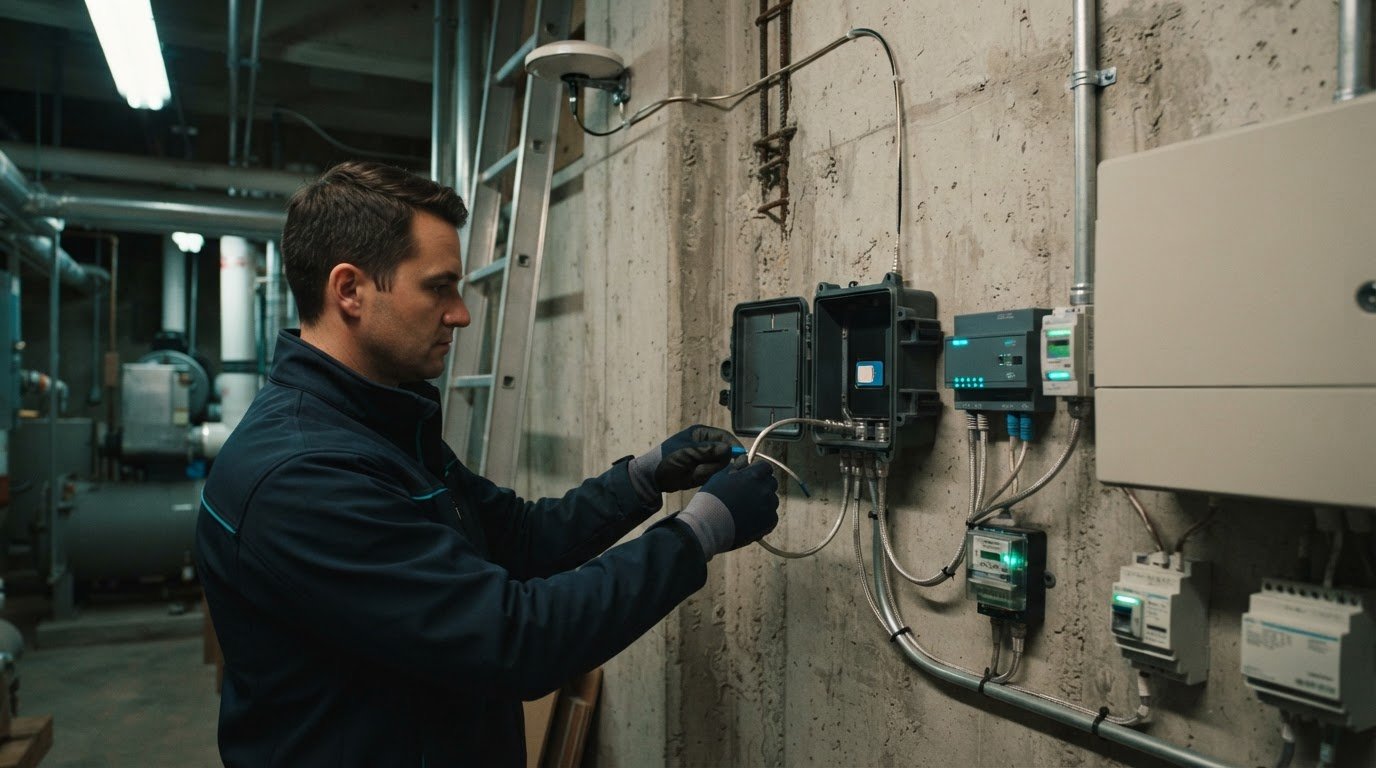
Smart building connectivity can’t stop at the router. Cellular connectivity for smart buildings connects sensors and building systems through mobile networks, adding a wireless path alongside Wi-Fi and wired connections. It can support data exchange across systems, but indoor signal strength depends on carrier coverage and the building’s structure.
A strong outdoor cellular signal does not guarantee reception on every floor or in every room. Concrete, metal, low-emissivity glass, equipment rooms, and below-grade spaces can weaken indoor signals, creating gaps where connected systems need dependable communication.
This guide explains how cellular links fit into a smart building’s network architecture, how sensors, lighting, energy management, and security systems use connectivity, and why indoor coverage needs attention. You’ll also learn how building materials and layout affect signal, where cellular can complement Wi-Fi, and how connectivity planning can support reliable operations as a building’s systems evolve.
Key Takeaways
- Map each building system to its connectivity needs so sensors, controls, and platforms can exchange useful data.
- Plan for indoor signal obstacles, including building materials and spaces where cellular reception may weaken.
- Choose a mix of cellular and other wireless technologies based on device mobility, coverage, and data requirements.
- Connect occupancy and environmental data to smarter decisions about lighting, HVAC, energy use, and security.
- Explore how multi-carrier IoT SIMs and centralized device management can help coordinate connected building deployments.
Smart building components and system architecture
A smart building connects field devices, network infrastructure, and management applications. Cellular links can carry data between selected devices and remote systems, while Wi-Fi and wired networks serve other building needs.
Connected Building Systems
Connected building systems use cellular connectivity to link sensors and devices with applications that monitor or control building operations. For example, a temperature sensor can send readings to a platform that coordinates HVAC adjustments. This lets operators bring distributed equipment into a shared view, including devices on separate floors or at different buildings.
Building systems typically include sensors, controllers, communications equipment, and management platforms. Sensors capture conditions, controllers execute commands, and applications interpret incoming data. Cellular connectivity can give a device a communication path to a remote platform without relying solely on the building’s local Wi-Fi network.
System Architecture and Connectivity
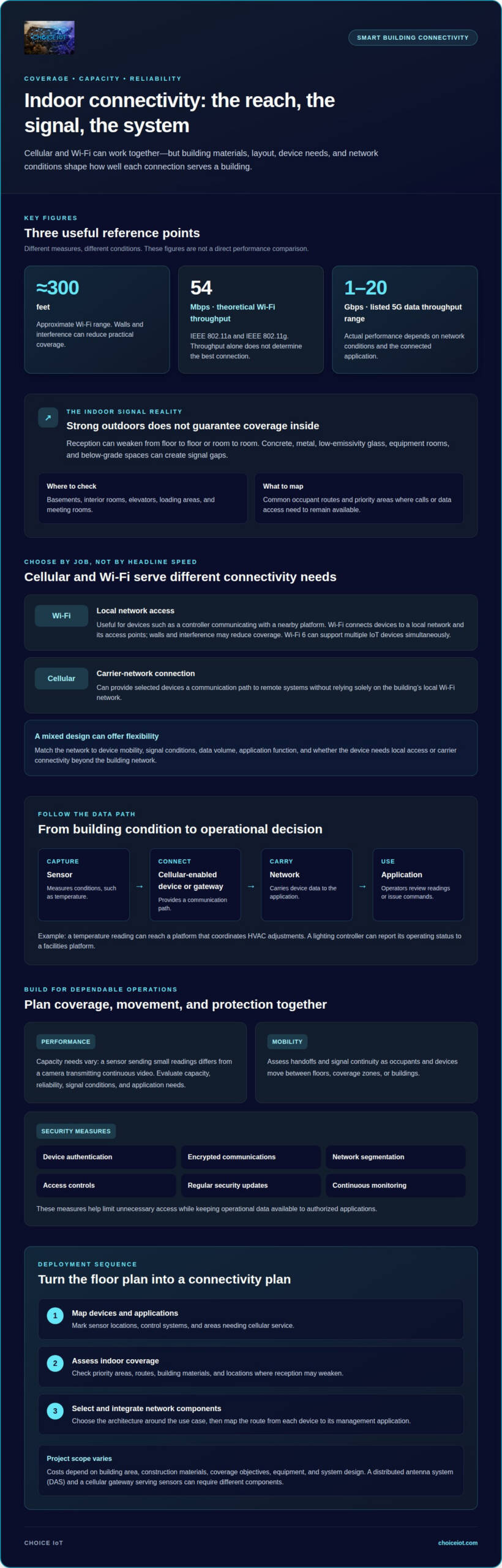
Start with the data path. A sensor communicates through a cellular-enabled device or gateway; the network carries its data to an application, where operators can review readings or issue commands. For example, a connected lighting controller can report its operating status to a facilities platform.
Different applications have different bandwidth needs. The Institute of Electrical and Electronics Engineers (IEEE) lists theoretical Wi-Fi throughput of 54 Mbps for IEEE 802.11a and IEEE 802.11g. Throughput alone doesn’t determine the best connection: device mobility, signal conditions, data volume, and the application’s function all matter. A mixed network can give building systems flexibility.
Requirements for In-Building Cellular
For U.S. consumer signal boosters, FCC Part 20 systems are pre-approved to amplify and distribute off-air cellular signals. Carrier requirements depend on the equipment and network connection; carrier device certification addresses device compatibility, while a signal booster system has a different role.
Plan around the use case. A cellular-connected sensor, a carrier signal booster, and a distributed antenna system (DAS) are not interchangeable: their equipment and deployment requirements differ. Identify which devices need cellular service, where they operate, and how their data reaches the building application.
Costs and Deployment Considerations
Project costs depend on building area, construction materials, coverage objectives, equipment, and system design. A DAS may require different components from a cellular gateway serving a group of sensors, so the chosen architecture shapes the project scope.
Follow a clear deployment sequence: map devices and applications, assess indoor coverage, then select and integrate network components. For a commercial building, mark sensor locations, control systems, and areas needing cellular service on a floor plan. This helps set coverage priorities and map the route from each device to its management application.
Coverage, capacity, reliability, security, and mobility
Indoor performance depends on signal reach, network capacity, and device movement through the building. Wi-Fi and cellular can work together, but they address different connectivity needs.
Indoor Voice and Data Coverage
Indoor cellular coverage means carrier-network voice and data service is available inside a building. It matters when occupants need mobile service where outdoor signals weaken, such as basements, interior rooms, or spaces behind dense building materials.
Voice calls and data sessions both need a usable signal along an occupant’s route. A mobile device may connect near a window but lose service farther inside. Map common routes and priority areas, then identify where calls or data access must remain available, such as elevators, loading areas, and meeting rooms.
Cellular and Wi-Fi Coverage
Cellular uses a carrier network, while Wi-Fi typically connects devices to a local network and its access points. Wi-Fi’s approximate range is 300 feet, but walls and interference can reduce practical coverage. The 2.4 GHz and 5 GHz bands also behave differently across building layouts.
Use Wi-Fi for devices that need local network access, such as a controller communicating with a nearby platform. Cellular can serve devices that need a carrier connection beyond the building’s local network. Wi-Fi 6 can support multiple IoT devices simultaneously. A combined design can enable local applications and wider-area connectivity without treating either network as a universal replacement.
Network Performance and Mobility
Network performance combines capacity, reliability, security, and mobility. For example, a sensor sending small readings has different capacity needs from a camera transmitting continuous video. The listed 5G data throughput range is 1-20 Gbps, while actual performance depends on network conditions and the connected application.
Mobile occupants and devices may move between floors, coverage zones, or buildings, so evaluate handoffs and signal continuity along those routes. Protect connected systems with device authentication, encrypted communications, network segmentation, access controls, regular security updates, and continuous monitoring. These measures help limit unnecessary access while keeping operational data available to authorized applications.
Choosing a Cellular Service Model
Carrier service connects devices through a carrier network; a private cellular network provides a dedicated network environment for an organization’s devices. To choose between them, weigh coverage needs, device control, deployment scope, and whether devices must connect across locations.
For example, a facility with devices across multiple sites may prioritize carrier-network access, while a campus that needs tighter control over local devices may consider private cellular. First compare applications, mobility patterns, and network management requirements. Then match the service model to the building’s coverage plan and the systems it must support.
IoT sensors, smart lighting, energy management, and security
Cellular links can connect building devices to applications that monitor conditions, coordinate controls, and report system status. Examples include environmental sensors, lighting controllers, energy meters, and security gateways.
Sensors, Controllers, and Platforms
Sensors capture conditions, controllers act on inputs, and management platforms organize the resulting data. Together, these components turn signals from building infrastructure into useful operational information.
For example, an occupancy sensor can report room use to a platform while a controller adjusts lighting or HVAC settings. Cellular connectivity can carry readings from distributed equipment to a remote application. This is useful when devices are mobile, spread across locations, or need a communication path beyond a local network.
Wireless sensors can also feed energy-management applications. A platform can compare occupancy and environmental readings, then support demand-based scheduling instead of fixed operating periods. Smart-building technology can cut energy costs by 20-30% through intelligent scheduling and demand-based operation. The value comes from matching system activity to observed building conditions.
Battery life and reporting frequency shape sensor deployment. 5G IoT machine-to-machine communications can support battery life of up to 10 years. For a facilities team, the design question is how often each device must transmit and whether its application needs frequent updates or occasional status reports. Those choices influence how sensors deliver useful data without unnecessary communication.
Cellular-Connected Building Applications
Cellular-connected building applications use mobile networks to link smart lighting controls, energy meters, environmental sensors, and security equipment with monitoring systems. This helps facilities collect data from devices distributed across rooms, floors, or locations.
Lighting offers a practical example. Occupancy data can help offices coordinate lighting with room use, while environmental readings can inform HVAC operation and space utilization. Hotels can use occupancy and environmental data to optimize rooms. Cellular links carry device data to applications that help operators coordinate these functions.
Security systems can use connected devices to report status and events to a management application. Apply device authentication, encrypted communications, network segmentation, access controls, regular security updates, and continuous monitoring to protect information traveling between devices and applications. Separating security equipment from unrelated systems also helps limit unnecessary access across building infrastructure.
Collect data to support a defined operational decision. For example, an energy application can use occupancy readings to inform schedules, while a security platform can surface device status for review. Define the response each application should support before connecting sensors. This keeps data useful to occupants and operators instead of collecting readings without a clear purpose.
Cellular in-building wireless and signal obstruction
Assess indoor cellular coverage by mapping signal conditions throughout occupied areas, then testing voice and data service along real operating routes. This reveals where materials or layout interrupt connectivity and where added wireless infrastructure may help.
Signal Obstruction Inside Buildings
Signal obstruction occurs when building materials or interior structures weaken cellular radio signals before they reach devices. This matters because an outdoor signal can become unreliable indoors, affecting occupants and connected operations.
Concrete, metal, coated glass, and dense equipment areas can block or weaken signals. A basement plant room, for example, may have different reception from a window-facing office on the same floor. Use floor plans to identify likely problem zones, including elevator cores, stairwells, and interior meeting rooms.
In-building wireless systems distribute cellular signals through antennas positioned around a facility. A distributed antenna system (DAS) uses connected antennas to extend coverage into areas that need it. Its design must account for the building layout, signal source, and coverage demands. A DAS is distinct from a local Wi-Fi network, even when both support the same operations.
Plan connectivity before construction is complete. This allows pathways and equipment locations to be considered alongside other building infrastructure, rather than added after walls and ceilings are finished. In an existing facility, start with a floor plan and mark known weak-signal areas, high-use spaces, and common occupant routes.
Assessing Indoor Cellular Signals
An indoor signal assessment maps cellular reception and service quality across the spaces and routes a building depends on. It matters because a single reading near an entrance cannot show whether devices maintain service throughout the facility.
Test with mobile devices in representative locations, including central rooms, lower levels, and areas behind dense materials. Record signal readings and whether voice calls or data sessions remain usable. Repeat checks along corridors and elevator lobbies, where movement can reveal gaps that a stationary test misses.
Compare results across floors and locations, then mark weak areas on the building plan. Separate voice needs from connected-device requirements: a facilities sensor may send small data updates, while occupants need voice and mobile data as they move through the building. This distinction helps define where cellular coverage needs improvement and what performance matters.
For consumer signal boosters, FCC Part 20 systems are pre-approved to amplify and distribute off-air cellular signals. The assessment should identify the weak zones and the signal conditions around the building before selecting an approach. A coverage map gives designers a practical basis for positioning in-building wireless equipment and supporting seamless operations.
Choice IoT: Multi-Carrier IoT SIM
Choice IoT’s Multi-Carrier IoT SIM supports connected building devices that need cellular access across locations. It suits deployments where operators want to coordinate SIM connectivity with device provisioning, monitoring, and security.
The CAMP™ IoT Platform provides centralized management for IoT deployments, while Private APN supports a private network connection for device data. Together, these services help solution providers and facilities teams plan connectivity around their buildings’ devices, applications, and network architecture.
For a building project with distributed sensors or connected systems, consider how SIM connectivity and centralized management fit the deployment. Contact Choice IoT at sales@choiceiot.com or visit choiceiot.com to discuss your connectivity requirements.
Build a Connectivity Plan That Can Evolve
Start by defining how your building will use connected systems as needs change. Identify which applications depend on mobile-network access, which need local connections, and how devices will be managed across locations. This makes cellular connectivity for smart buildings an infrastructure decision aligned with operational priorities, rather than a standalone technology choice.
Choice IoT offers Multi-Carrier IoT SIM, the CAMP™ IoT Platform, and Fixed Wireless Connectivity. These offerings can support connected-device access, centralized deployment management, and building connectivity requirements. The right combination depends on the systems, coverage needs, and management model you’re designing for.
Start a conversation about the connectivity requirements behind your building project. Contact Choice IoT about building connectivity and take the next step toward an architecture built around your facilities’ needs.
Frequently Asked Questions
Why would I want that?
Cellular connections give building devices a communication path that doesn’t depend on occupants’ Wi-Fi access. This can help with remote equipment, distributed sensors, or sites where adding local network connections is difficult. For example, a facilities team could monitor a utility meter in a separate building through a cellular connection. The practical benefit is access to device data across locations, with the network matched to each application.
What is cellular connectivity in smart buildings and how does it work?
Cellular connects building devices to applications through a mobile network. A cellular-capable device, or a gateway connected to it, sends readings to a software platform, where the data can support monitoring and operational decisions. For example, a water sensor could send an alert to a remote application. Cellular connectivity for smart buildings is useful when devices need a connection beyond the local building network.
What cellular technologies are used in smart buildings: 4G LTE, 5G, LTE-M, and NB-IoT?
Smart-building deployments may use 4G LTE or 5G for cellular data, while LTE-M and NB-IoT are cellular technologies designed for IoT use cases. The suitable option depends on device capabilities, coverage, data needs, and how frequently equipment communicates. A mobile gateway carrying operational data may have different requirements from a sensor sending periodic readings. Confirm that the selected device and its application support the network technology used in the deployment.
How does cellular connectivity compare with Wi-Fi, Ethernet, and LoRaWAN for smart buildings?
Cellular connects through a mobile network; Wi-Fi provides wireless access to a local network, while Ethernet uses a physical cable. LoRaWAN is a wireless option suited to devices that send small amounts of data over a low-power network. A building might use Ethernet for fixed control equipment, Wi-Fi for local devices, and cellular for equipment needing remote network access. Match each connection to the device’s location and application needs.
What are the security and privacy risks of cellular-connected building systems?
Risks include unauthorized device access, exposed credentials, intercepted data, and collecting more occupant information than an application needs. A compromised sensor could also provide an entry point to connected systems if networks are not separated. Limit device permissions, use unique credentials, restrict access to operational data, and review who can view or change settings. For an occupancy system, retain only information needed for building operations and control access to those records.
How do DAS and small cells improve cellular coverage in large or dense buildings?
A distributed antenna system (DAS) carries cellular signals to multiple antennas across a building, helping serve areas with weak reception. Small cells are compact cellular access points that add localized coverage and capacity. A large facility might use distributed antennas across interior zones, while a targeted small-cell installation may address a defined area. The choice depends on building layout, carrier needs, signal source, and the coverage area to be served.