
Connected devices are useful only when their data can be understood and acted on. IoT data management covers the tools and practices used to collect, organize, analyze, store, and share device data. IoT data plan management software also helps teams oversee connectivity and access alongside that data.
As deployments grow, so do the data streams teams need to coordinate. Useful insights depend on keeping those streams organized and accessible to the right people. The challenge is not just collecting data, but making it actionable while keeping devices, users, and permissions under control.
This article explains how IoT data management software collects and structures information, turns it into insights, and supports deployment, tenant, permission, and identity management. Use these capabilities to assess what your IoT operation needs and where connectivity management fits.
Key Takeaways
- Match cloud, hybrid, edge, or on-premises deployment to where data must be processed and how it needs to move.
- Use dashboards and reports to turn device data into clear operational signals and more informed decisions.
- Separate tenants, permissions, and identities to organize access across teams and IoT deployments.
- Compare platforms by the management capabilities your operation needs, including usability as deployments scale.
- See how Choice IoT’s Multi-Carrier IoT SIM and CAMP™ IoT Platform fit connectivity and centralized deployment management.
Cloud, hybrid, edge, and on-premises deployment
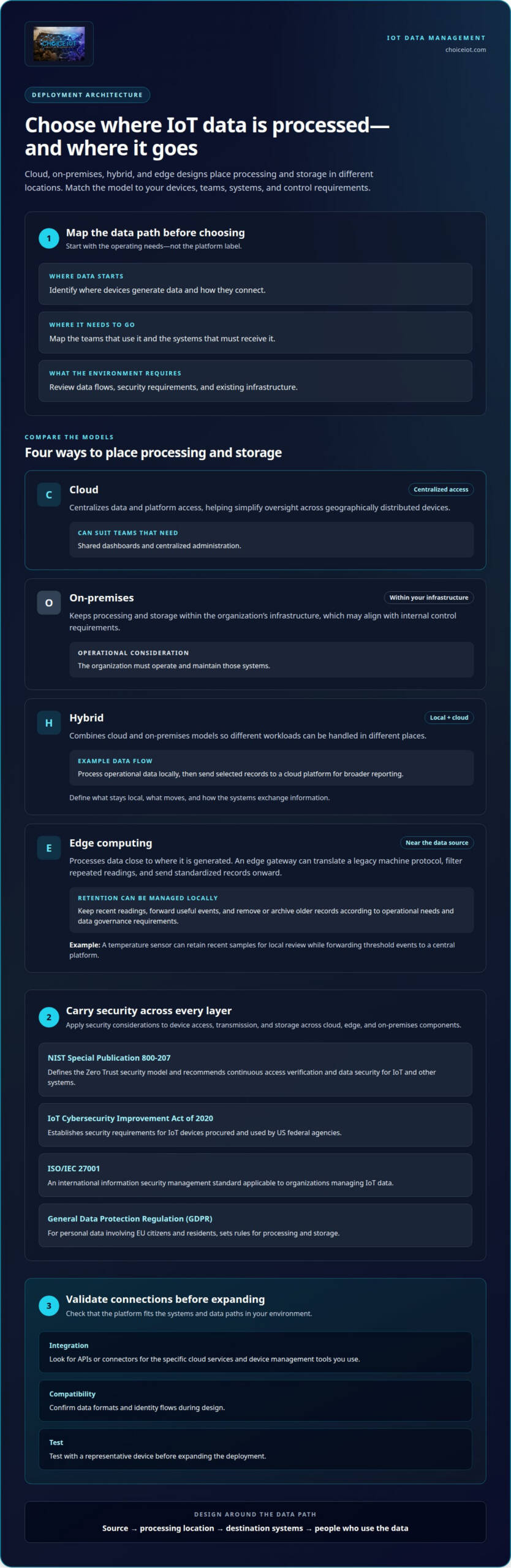
Choose a deployment model by identifying where devices generate data, where teams need to use it, and which systems must receive it. Before deploying IoT data plan management software, map device connections, data flows, security requirements, and existing infrastructure. Then select a cloud, hybrid, edge, or on-premises design that fits those needs.
Cloud deployment centralizes data and platform access, simplifying oversight across geographically distributed devices. It can suit teams that need shared dashboards and centralized administration. On-premises deployment keeps processing and storage within an organization’s infrastructure, which may align with internal control requirements. The organization must also operate and maintain those systems.
Hybrid deployment combines cloud and on-premises models. For example, a facility can process operational data locally while sending selected records to a cloud platform for broader reporting. This keeps time-sensitive workloads close to their source while enabling centralized analysis of other data. Before connecting production devices, define what stays local, what moves, and how the systems exchange information.
Edge computing processes data near its source. An edge gateway can translate a legacy machine protocol, filter repeated readings, and send standardized records onward. For example, it could convert equipment messages into a format a cloud platform can process. This helps connect older machines without requiring every downstream system to interpret each legacy protocol.
Edge controls can also help manage data retention. Set rules for keeping recent readings locally, forwarding useful events, and removing or archiving older records according to operational needs. A temperature sensor, for example, might retain recent samples for local review while forwarding threshold events to a central platform. Match retention rules to the use case and the organization’s data governance requirements.
Security applies across cloud, edge, and on-premises components. NIST Special Publication 800-207 defines the Zero Trust security model and recommends continuous access verification and data security for IoT and other systems, according to the National Institute of Standards and Technology. The IoT Cybersecurity Improvement Act of 2020 establishes security requirements for IoT devices procured and used by US federal agencies, according to U.S. Congress.
ISO/IEC 27001 is an international information security management standard applicable to organizations managing IoT data, according to the International Organization for Standardization. For personal data involving EU citizens and residents, the General Data Protection Regulation sets rules for processing and storage, according to the European Union. Apply these considerations to device access, transmission, and storage across every deployment layer.
Which IoT data plan management platforms integrate with cloud services and device management tools? Look for platforms with APIs or connectors for the specific services and systems in your environment. During design, confirm data formats and identity flows, then test with a representative device before expanding the deployment.
Dashboards, reports, and data visualization
Dashboards make connected-device activity easy to scan, while reports preserve trends for review. A useful IoT monitoring setup connects each view to a decision, such as investigating unusual network usage.
Usage Dashboards and Reports
A usage dashboard can show IoT data consumption by device, group, or reporting period. Reports organize that information for comparison and follow-up. This distinction matters because a fleet-wide total can hide one machine transmitting far more data than its peers.
For example, group devices by site and compare usage trends. Add context such as device status or service type where available. A report that shows a sharp change at one site helps the operations team focus its investigation instead of treating every connected device as a possible cause.
Choose visualizations that make the next action clear. A line chart can show how a device’s data use changes over time, while a table can identify which devices contribute most to a total. Use consistent labels across dashboards and exports so teams can compare the same site, device group, and period.
Keep operational signals separate from summary metrics. A network team may need device-level usage to diagnose a connection, while a manager may need a group-level view of trends. Filters for location, device type, and status make these views more useful without combining unrelated devices.
Reports also provide a record for investigation. If a sensor starts sending repeated messages, compare its usage before and after the change, then review related device or application logs. This helps distinguish a change in normal activity from a network or configuration issue.
Monitoring Usage and Preventing Overages
Usage monitoring measures data consumption against a device or group’s plan allowance. Alerts help teams respond before consumption reaches a configured limit. IoT platforms do this by collecting consumption records, comparing them with thresholds, and flagging devices or groups approaching those limits.
To reduce overage risk, set thresholds that reflect each plan’s allowance and the device’s expected behavior. For example, alert the team when a remote sensor group approaches its limit, then investigate unusually frequent transmissions. Review the device’s reporting pattern and adjust its configuration where appropriate.
Alerts are most useful when ownership is clear. Route a critical usage alert to the team responsible for the affected device group, and include the device identifier and recent usage trend. That context helps responders decide whether to investigate, change reporting behavior, or review the plan.
For network-side visibility alongside data reporting, explore IoT connectivity management as part of the monitoring setup.
Multi-tenancy, permissions, and identity management
Security risks include unauthorized access, weak identity controls, and exposure of data between tenants. Compliance risks arise when teams collect, share, or retain personal information without applying the requirements relevant to their markets and industries.
A tenant is a separately managed organization, customer, or business unit within an IoT platform. For example, an integrator can separate one customer’s sensors and users from another’s while maintaining central oversight. Define tenant boundaries before onboarding devices so data and administration remain assigned to the right organization.
Permissions define which actions each identity can perform. A role-based model might let an operations user view device status while reserving configuration changes for an administrator. Apply least privilege by granting only the access needed for each task. Review permissions when a user changes teams or responsibilities.
Identity management connects people, devices, and applications to controlled access. Give each device a distinct identity instead of sharing credentials across a fleet. If a sensor is replaced, for example, revoke its identity and assign credentials to the replacement. This limits the reach of a compromised device and makes access records easier to interpret.
Map the data path from source to destination. A sensor may produce readings, an application may transform them, and an analytics service may identify patterns. Preserve tenant identifiers and access rules at every handoff. If identifiers disappear during processing, a report or learning workflow could expose one customer’s information to another.
Separate data visibility from data administration. A customer may need to view its own device records without changing network settings or managing another tenant’s users. Define permissions for viewing, exporting, editing, and deleting data separately. Then test each role with a sample account before enabling access across the live deployment.
Compliance depends on the personal data involved and where the application operates. The European Union’s General Data Protection Regulation sets rules for processing and storing personal data of EU citizens and residents. The California Consumer Privacy Act gives consumers rights to know what personal data is collected, request its deletion, and opt out of its sale.
Use a practical access review to find gaps before they affect operations:
- List tenants, users, devices, and connected applications.
- Compare each identity’s permissions with its current role.
- Test whether users can access records outside their assigned tenant.
- Revoke inactive identities and document approved exceptions.
For example, an integrator managing several customer fleets can give each customer its own tenant, then review administrator access centrally. This supports controlled integration and clearer responsibility as deployments change.
How do IoT data plan management platforms compare by features and usability?
Compare platforms based on the work your team needs to do, not feature counts alone. A fleet operator, for example, may prioritize usage visibility, while an integrator may need clear customer separation and device administration. The right fit makes routine tasks understandable, connects with existing systems, and supports the deployment’s operating model.
Start with a feature matrix built around real workflows. Record whether each platform supports tasks such as viewing device status, organizing assets, analyzing usage, and managing access. Separate essential capabilities from optional ones. A platform with fewer features may be easier to operate if its core workflows match your deployment.
- Connectivity oversight: Check whether teams can view usage and device connection information together. For a remote sensor fleet, this can help connect unusual consumption with device activity.
- Device administration: Assess how users locate, group, and update device records. A site-based grouping model can simplify support for equipment spread across locations.
- Data visibility: Review dashboards, exports, and reporting filters. For example, confirm whether operators can isolate a device group without losing fleet-wide context.
- Access controls: Compare how roles and customer boundaries are configured. An integrator should be able to manage customer environments without mixing their records.
Usability is the effort required to complete a task accurately. Test a common workflow, such as finding a device, reviewing its recent activity, and identifying its assigned group. Note unclear labels, repeated navigation, and steps that require specialist knowledge. These details affect daily operations more than a polished overview screen.
Test integrations separately. List the cloud services, device-management tools, and data destinations already in use, then map how information must move between them. For example, check that a device identifier stays consistent as records move from a management platform to an analytics system. Clear data mapping reduces manual reconciliation.
Evaluate scale with representative scenarios rather than unsupported capacity claims. Include adding a device group, onboarding a customer, and changing user permissions. Observe whether administrators can complete each task using repeatable controls. This shows whether the platform can accommodate operational changes without making routine administration cumbersome.
Before selecting a platform, have an administrator and an operations user complete the same scenario. Compare their results, identify missing workflow steps, and document which features are essential. This practical evaluation gives decision-makers a clearer basis for comparison than interface appearance alone.
For connectivity and platform options aligned with your deployment, explore IoT connectivity solutions.
Choice IoT: Multi-Carrier IoT SIM
Choice IoT’s Multi-Carrier IoT SIM supports solution providers managing connected deployments across networks. For centralized oversight of connectivity alongside deployment administration, the CAMP™ IoT Platform provides tools for provisioning, monitoring, and securing IoT deployments.
Choice IoT also offers Fixed Wireless Connectivity and Private APN for deployments that need these options. These services support connectivity planning around device requirements, while CAMP™ centralizes management. CAMP™ also provides static IP options for deployments that need them.
To discuss connectivity and deployment management for your IoT operation, contact Choice IoT at sales@choiceiot.com.
Turn your IoT strategy into an operating plan
Turn platform selection into clear operational ownership. Assign responsibility for data governance, access reviews, and service monitoring. Document who handles a device change, unexpected usage, or a new customer deployment. Clear decision rights help teams respond consistently as connected operations evolve.
Treat IoT data plan management software as part of a broader operating model, not a standalone dashboard. Define how teams will act on operational signals, approve configuration changes, and share relevant information across business functions. Set a review cadence to assess whether current processes continue to support deployment needs.
With those responsibilities in place, you can shape a rollout around your organization’s priorities and refine it as requirements change. If you’re ready to discuss how IoT connectivity and management can support your deployment, contact Choice IoT to discuss your needs. Take the next step with a plan your team can put into action.
Frequently Asked Questions
What is IoT Data Management?
IoT data management is the work of handling information generated by connected devices throughout its lifecycle. It includes collecting readings, organizing records, maintaining data quality, controlling access, and making information available to applications. For example, a facilities team might combine equipment sensor readings with maintenance records to investigate recurring faults. Clear ownership and consistent device identifiers help teams trace information from its source to its use.
What Are IoT Management Platforms?
IoT management platforms are software environments for administering connected deployments and their operational information. Depending on the platform, teams may use them to provision devices, monitor connectivity, review usage, diagnose issues, or connect data with business systems. For example, an integrator supporting customer fleets can use a central interface to locate a device and review its service status instead of managing each deployment as a separate workflow.
What features should IoT data plan management software include?
IoT data plan management software should make it practical to connect usage information with the devices and teams responsible for it. Look for clear device identification, usage reporting, threshold alerts, access controls, and export or API options suited to your workflows. For example, an alert tied to a specific SIM and device helps an operator investigate a usage change. Also assess whether administrators can automate routine provisioning tasks.
Which IoT connectivity management platforms support multiple carriers and countries?
Multi-carrier connectivity platforms are designed to manage deployments that use more than one carrier. Choice IoT’s Multi-Carrier IoT SIM can steer among multiple carrier networks, including global networks. For international deployments, assess whether the platform provides the carrier visibility and SIM administration your operations team needs across locations. Also consider how the connectivity setup fits existing devices and applications.
Which IoT software providers offer pay-as-you-go or pooled data plans?
Pay-as-you-go and pooled data plans are billing models to look for in an IoT connectivity provider’s plan terms. Pay-as-you-go generally bases charges on consumption, while pooled plans let eligible lines draw from shared data allowances. Before choosing, compare how usage is measured, which lines can share allowances, and how excess consumption is handled. These billing arrangements are separate from platform features such as dashboards or SIM administration.
How can businesses manage SIMs, eSIMs, and cellular IoT devices in one platform?
Businesses can use a connectivity management platform to bring SIM and device administration into a shared interface. CAMP™ supports centralized provisioning, monitoring, troubleshooting, analytics, alerts, and API access. Choice IoT also offers eSIM with over-the-air steering. For example, an operations team can review a device’s connectivity record in CAMP™, while an API supports programmatic management within an existing system.