

An offline IoT device isn’t automatically a faulty device. The failure may sit with the device, SIM, network, or platform, and changing settings before you know which layer is affected can create more problems than it solves. Effective troubleshooting IoT connectivity issues starts with evidence, not guesswork.
When devices drop offline or send inconsistent data, teams need a clear way to separate local faults from wider connectivity or platform issues. That’s even more important across remote deployments, where a site visit can be disruptive and unnecessary configuration changes can complicate recovery.
This guide gives you a repeatable sequence to trace a connection failure from the device outward, identify the likely cause, and choose a targeted recovery step. You’ll learn what to check across device, SIM, network, and platform layers, and how centralized visibility, diagnostics, and support history can help teams investigate patterns. The goal is straightforward: restore service with fewer guesswork-driven changes and avoidable field visits.
Key Takeaways
- Use symptoms such as offline status, missing telemetry, and intermittent sessions to guide your investigation, not to assume a cause.
- Compare evidence across the device, SIM, network, and application layers to narrow down where a connection is failing.
- Follow a low-risk troubleshooting sequence, preserve evidence, and test changes on one representative device before applying them fleet-wide.
- Make troubleshooting iot connectivity issues more repeatable by recording findings and escalating with clear supporting details.
- Use deployment-specific monitoring and reporting to spot recurring incidents and refine response priorities over time.
Troubleshooting IoT Connectivity Issues Starts with the Symptoms
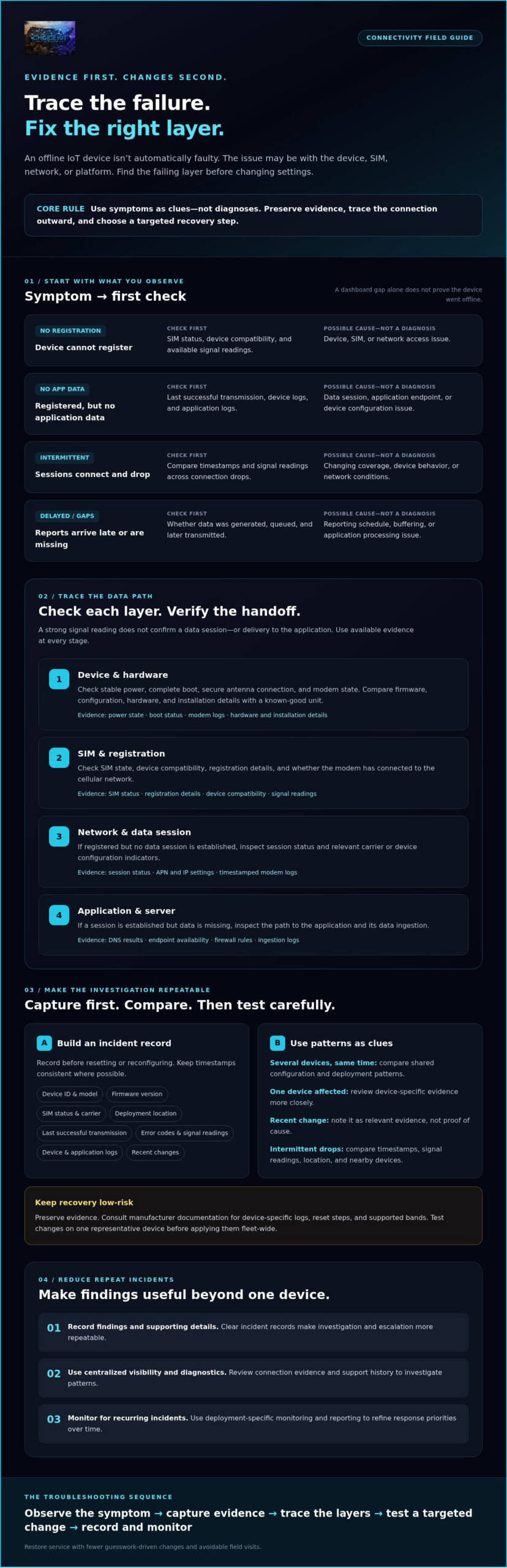
Offline status. Missing telemetry. Intermittent sessions or unexpected data gaps. These symptoms show that data isn’t arriving as expected, but they don’t identify the cause. Effective troubleshooting iot connectivity issues means locating the failing layer before applying a fix: device, SIM, network, or application.
Start with what you can observe. A device with no network registration has a different symptom from one that registers but can’t transmit data to its application endpoint. Registration confirms one stage of the connection, not the full path. For context on how connected sensing devices exchange information, see Wireless Sensor Network principles.
| Observed symptom | First check | Possible cause, not a diagnosis |
|---|---|---|
| No network registration | Check SIM status, device compatibility, and available signal readings. | Device, SIM, or network access issue. |
| Registered, but no application data | Compare the last successful transmission with device and application logs. | Data session, application endpoint, or device configuration issue. |
| Intermittent sessions | Compare timestamps and signal readings across connection drops. | Changing coverage, device behavior, or network conditions. |
| Delayed reports or data gaps | Check whether data was generated, queued, and later transmitted. | Reporting schedule, buffering, or application processing issue. |
What does an IoT connectivity failure look like?
A persistent outage means the expected connection or transmissions haven’t resumed. Intermittent connectivity means sessions succeed and fail over time. Delayed reporting may mean the device collected data but delivered it later, so a dashboard gap alone doesn’t prove the device went offline. Record affected device IDs, timestamps, locations, and recent changes, such as a firmware update or deployment move. These details help distinguish a single-device event from a shared pattern.
Which diagnostic details should teams capture first?
Build a concise incident record before resetting or reconfiguring anything. Capture the device model, firmware version, SIM status, carrier, and deployment location. Add the last successful transmission, relevant error codes, signal readings, and available device or application logs. Keep timestamps consistent where possible.
Then compare the affected device with others using the same configuration or deployment. If several devices show the same symptom at the same time, that pattern can help narrow the investigation. If only one is affected, device-specific evidence may deserve closer review. Treat these as clues, not proof. A consistent record gives the next diagnostic step a stronger foundation.
Trace IoT Connectivity Problems Across Device, SIM, Network, and Application
Once you’ve recorded the symptoms, trace the data path one layer at a time. A strong signal reading doesn’t confirm that a device has established a data session or delivered information to its application. Use the evidence available at each stage, and treat likely causes as leads to verify, not conclusions. This layered approach makes troubleshooting iot connectivity issues more systematic.
| Symptom | Likely layer to investigate | Evidence to inspect |
|---|---|---|
| No registration or modem connection | Device, SIM, or cellular network | Power, modem status, SIM state, signal readings, and registration details |
| Registered, but no data session | SIM, carrier configuration, or network | Session status, APN and IP settings, and relevant device or platform indicators |
| Session established, but application data is missing | Application or server | DNS results, endpoint availability, firewall rules, and ingestion logs |
| Connection drops intermittently | Device, coverage, or network | Timestamped modem logs, signal readings, location, and comparison with nearby devices |
Check the device, power, antenna, and configuration
Confirm stable power, a complete boot, a secure antenna connection, and the modem’s reported state. Compare firmware, configuration, hardware, and installation details with a known-good unit. A recent change may be relevant, but don’t assume it caused the fault. Consult manufacturer documentation for device-specific logs, reset steps, and supported bands before changing settings.
Verify SIM, registration, and data-session evidence
Use authorized connectivity-management tools to check SIM activation and account status. Where exposed, review registration, data-session, signal, and usage indicators. Validate APN and IP settings against the deployment configuration, then confirm carrier requirements rather than applying generic values. For additional context on network selection, see this multi-carrier IoT SIM guide.
Separate network delivery from application failure
If a data session is established, shift the investigation toward delivery and processing. Check endpoint availability, DNS resolution, firewall rules, and server logs where accessible. Ask application owners to compare device timestamps with ingestion and processing records. A successful cellular connection doesn’t prove that the application received or handled the payload.
Centralized visibility can help teams compare device, SIM, and usage status before choosing a recovery action. For an overview of Choice IoT’s CAMP™ connectivity management platform, review its documented capabilities alongside the evidence from your affected devices.
Follow a Safe, Repeatable IoT Connectivity Troubleshooting Checklist
A disciplined workflow protects working devices while narrowing the fault. For troubleshooting iot connectivity issues, preserve the evidence first, make the lowest-risk checks, and change one variable at a time. A temporary reconnection is useful, but it doesn’t confirm the root cause.
- 1. Define the incident. Confirm which devices are affected, when the issue began, their locations, and the most recent successful communication. Check whether the problem is isolated or shared across a deployment.
- 2. Compare the evidence. Review device, SIM, network, and application indicators together. Note recent changes and current status before attempting a reset or configuration update.
- 3. Select one representative device. Choose an affected unit whose configuration and symptoms reflect the broader issue. Test the proposed recovery action there first, and confirm whether it restores expected communication without disrupting devices that are working.
- 4. Change one variable and record the result. Log the action, timestamp, outcome, and a rollback option. If several settings change at once, it becomes harder to identify what helped or caused a new problem.
- 5. Verify recovery, then assess the cause. Confirm that data reaches its intended destination and continues to do so. Record whether the action resolved the fault or only restored service temporarily.
Use remote recovery actions carefully
A remote network reset may be appropriate after initial checks indicate a SIM connectivity issue. Consider its impact first, especially if affected devices are still communicating intermittently. Repeated resets can interrupt service and erase useful diagnostic context without addressing the underlying fault. CAMP™ includes Remote Network Reset, diagnostics, and support-note history, but a reset isn’t a universal fix.
If the issue persists, escalate with the incident timeline, device and SIM details, relevant logs, changes tested, and results. This gives device, carrier, or application teams a clearer starting point. For broader monitoring context, see the IoT connectivity management platform guide.
Review network settings only when evidence points there
If devices register but can’t reach an endpoint, verify APN, routing, firewall, and IP assumptions against the intended deployment design. Don’t change Private APN or Static IP Address settings based on guesswork. The Private APN for IoT guide offers additional context for private-network considerations.
For teams assessing centralized diagnostics and remote reset capabilities, explore the CAMP™ IoT Platform as part of a connectivity-management approach.
Prevent Recurring IoT Connectivity Issues with Monitoring and Clear Escalation
Restoring one device addresses the immediate disruption. Preventing repeat incidents requires a fleet-wide view: which devices are affected, whether incidents cluster by location or configuration, and what changed before the issue began. Consistent records turn troubleshooting iot connectivity issues into an ongoing operational process, not a series of isolated resets.
Use visibility, alerts, and history to spot patterns
Compare device and SIM status over time. Look for repeated failures tied to a particular deployment, configuration, or period, and review usage history for unexpected changes. Set alert thresholds around how each deployment is expected to behave, then validate them against normal reporting patterns. A threshold that’s too sensitive can create noise; one that’s too broad may delay investigation.
Keep diagnostic notes, configuration changes, and recovery outcomes with each incident. Device-change alerts can also help teams identify whether a change coincided with a new connection problem. With this context, a recurring symptom becomes easier to compare against earlier cases, while a confirmed fix can inform the response next time.
Build an escalation path that reduces repeat work
Define who investigates each fault domain. Device vendors may need to review hardware or firmware evidence; connectivity providers can assess SIM or network questions; application teams can check data ingestion and processing; infrastructure owners can review relevant routing or firewall controls.
Make escalations actionable. Share device identifiers, timestamps, error evidence, configuration details, and the checks already completed. When a root cause or effective fix is verified, update the runbook and incident record. That prevents teams from repeating unhelpful steps and gives future investigations a clearer starting point.
Centralize connectivity operations as deployments scale
As a fleet grows, scattered status checks make it harder to compare devices consistently. CAMP™ provides real-time visibility into devices, SIMs, and data usage, along with diagnostics and support-note history. These documented capabilities can support investigation and pattern review, but they don’t guarantee that every fault can be resolved remotely or prevent outages.
Remote Network Reset is another available CAMP™ capability for appropriate SIM connectivity recovery scenarios. Use it as a considered action, guided by the evidence, rather than as a universal response. To learn more, explore Choice IoT connectivity management.
Make Every IoT Incident Easier to Resolve
Reliable recovery starts with a clear process: use symptoms to locate the likely fault, follow the evidence across each layer, and test changes carefully before applying them more broadly. That’s the foundation of effective troubleshooting iot connectivity issues, and it helps teams distinguish a temporary reconnection from a verified resolution.
Over time, consistent incident records and deployment-aware monitoring can reveal patterns that one-off fixes miss. They also give device, connectivity, application, and infrastructure teams the context needed to investigate and escalate without repeating the same checks.
CAMP™ supports this work with real-time visibility across devices, SIMs, and data usage, plus documented diagnostics, troubleshooting tools, and Remote Network Reset for appropriate recovery scenarios. These capabilities can help teams assess connectivity, but they don’t guarantee a fix for every fault. Explore Choice IoT connectivity management to learn more about the platform.
With a repeatable workflow and better fleet visibility, your team can approach the next connectivity incident with greater clarity and confidence.
Frequently Asked Questions
Why is my IoT device connected to the cellular network but not sending data?
Cellular registration confirms network access at one stage, but it doesn’t confirm that the device has established a data session or delivered information to its application. Check the session status, APN and IP settings, and device logs, then verify DNS resolution and endpoint availability where accessible. Compare device transmission timestamps with server ingestion records. If the device reports sending data but the application has no matching record, involve the application or infrastructure team.
How do I troubleshoot an IoT SIM that is not connecting?
Start by checking SIM activation and account status through your authorized connectivity-management tools. Then verify that the SIM is correctly installed, the device recognizes it, and the modem reports its current registration state. Review the device’s supported bands and required network settings against the deployment configuration. If other devices using the same setup connect normally, capture the affected device’s logs and error details before considering a SIM or hardware fault.
Can weak cellular signal cause intermittent IoT connectivity issues?
Yes. Weak or variable signal may contribute to dropped sessions or inconsistent reporting, depending on the device, antenna, location, and network conditions. Check timestamped signal readings alongside connection events, and compare results across locations or similar devices. Signal strength alone doesn’t prove the cause or confirm successful data delivery. If signal readings appear stable, check session status and application logs before changing network settings.
What should I check when an IoT device goes offline?
For troubleshooting iot connectivity issues, first establish when the device last communicated and whether the outage affects one unit or a group. Check power, boot and modem status, SIM state, signal readings, and recent firmware or configuration changes. Then determine whether the device registered and established a data session. Compare the findings with application logs to distinguish a connectivity outage from delayed reporting or a downstream processing issue.
How can I reset an IoT connection remotely?
If the evidence points to a SIM connectivity issue, an authorized remote network reset may be an appropriate recovery step. Before using one, record the current status and consider whether resetting could interrupt a device that’s still communicating. Choice IoT’s CAMP™ platform includes Remote Network Reset. After the action, verify that the device reconnects and data reaches its destination. A restored connection is useful, but it doesn’t by itself confirm the root cause.
When should I contact my carrier or IoT connectivity provider?
Escalate when SIM status, registration, or data-session evidence suggests a connectivity issue that you can’t resolve through approved checks, or when multiple devices show a related pattern. Share device and SIM identifiers, timestamps, location, error details, relevant configuration, and the checks already completed. If registration and data sessions appear normal but application data is missing, involve the application or infrastructure owner too. Clear evidence helps direct the investigation to the right team.