

Coverage is only the starting point. The real question is how to choose an iot connectivity provider that can support your deployment now and keep operations manageable as it grows. A strong coverage claim won’t tell you how easily you can track SIMs, respond to connectivity issues, or confirm that devices fit the networks you plan to use.
Comparing providers can be difficult when each emphasizes different capabilities. And once devices are deployed, fragmented visibility and manual troubleshooting can add operational work. The right choice depends on your deployment’s locations, devices, usage patterns, security needs, and plans for scale, not a single headline feature.
This guide gives you a practical framework for building a defensible shortlist. You’ll assess network and device fit, connectivity options, management tools, security controls, and support for day-to-day operations. You’ll also see how capabilities such as multi-carrier IoT SIMs and CAMP™ visibility, alerts, diagnostics, and remote network resets can help streamline connectivity management. The result: a clearer view of which provider model fits your technical requirements today and your growth plans tomorrow.
Key Takeaways
- To decide how to choose an iot connectivity provider, score candidates against your device footprint, operating needs, security requirements, and rollout plans.
- Compare provider claims using deployment-specific evidence, including network and device fit, rather than relying on broad coverage statements.
- Run a practical operations test: activate a representative device group, monitor it, diagnose an issue, and adjust its connectivity.
- Build a weighted shortlist that reflects the needs of your deployment, whether it involves remote assets, mobile fleets, or distributed business devices.
How to Choose an IoT Connectivity Provider: Start With the Deployment
Provider selection shapes more than how devices connect. It affects rollout decisions, the work required to manage SIMs and incidents, and how smoothly the deployment can expand. An IoT connectivity provider enables devices to exchange data over networks. The network technology is only one part of the fit; provisioning, visibility, diagnostics, security controls, and reporting shape the day-to-day experience too.
Start with the deployment, not a provider’s headline claims. A sensor that sends occasional readings has different connectivity and monitoring needs from a mobile device that reports frequently. The What is the Internet of Things? overview provides useful context on how connected devices, networks, and applications work together. That system-level view helps clarify where connectivity fits in your solution.
Define the deployment before comparing providers
Document what the devices do and where they’ll operate. Then translate that picture into measurable requirements. Keep current needs separate from likely changes, so a shortlist works for launch without overlooking future expansion.
- Devices and movement: List device types, whether they’re fixed or mobile, and how they connect to your application.
- Locations and scale: Map deployment locations and expected device volumes. Consider whether the footprint may broaden over time.
- Data behavior: Record how often devices transmit, typical usage, and whether applications are sensitive to latency or interruptions.
- Growth and change: Note planned rollout stages, new device types, or evolving usage patterns that could change connectivity requirements.
This inventory helps distinguish essential requirements from preferences. For example, a mobile fleet may need network flexibility across its operating footprint, while fixed equipment may call for a different connectivity setup. For a closer look at network flexibility, use this multi-carrier IoT SIM card guide.
Identify the operating model and decision owners
Map the people and processes behind the deployment. An end operator, VAR, integrator, and solution provider may each own different parts of the connectivity lifecycle. Identify who provisions SIMs, monitors usage, responds to incidents, and prepares performance reports. If those tasks sit across teams, define how information and responsibility move between them.
Then assess what tools those owners need. A centralized platform such as CAMP™ can provide a single dashboard for device, SIM, and data-usage visibility. That operational layer matters: a practical answer to how to choose an iot connectivity provider accounts for both network fit and the workflows required to manage devices after activation.
Which IoT Connectivity Provider Capabilities Matter Most?
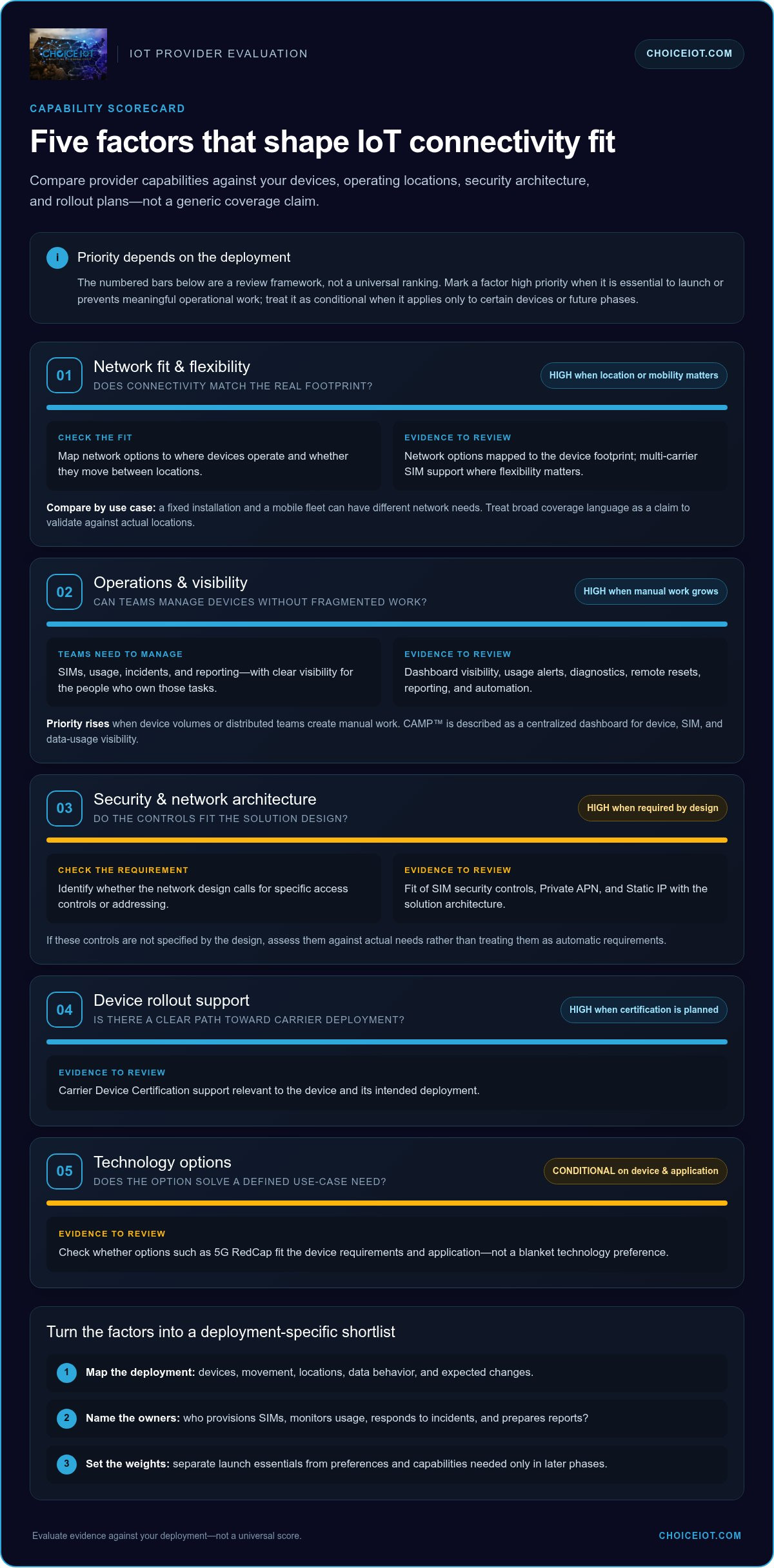
Use a comparison framework that reflects the deployment, not a generic checklist. Score each capability by how directly it affects device connectivity, operational workload, security architecture, or rollout readiness. Mark a requirement high priority if it’s essential for launch; treat it as conditional if only some devices or future phases need it.
| Criterion | Deployment requirement | Evidence to review | Priority |
|---|---|---|---|
| Network fit and flexibility | Devices must connect in their actual operating locations, including while mobile if relevant. | Network options mapped to the device footprint; multi-carrier SIM support where flexibility matters. | High when locations or mobility make network choice critical. |
| Operations and visibility | Teams need to manage SIMs, usage, incidents, and reporting efficiently. | Dashboard visibility, usage alerts, diagnostics, remote resets, reporting, and automation. | High when device volumes or distributed teams create manual work. |
| Security and network architecture | The solution’s network design calls for specific access controls or addressing. | Fit of SIM security controls, Private APN, and Static IP with the solution architecture. | High when required by the design; otherwise assess against actual needs. |
| Device rollout support | Hardware needs a clear path toward carrier deployment. | Carrier Device Certification support relevant to the device and intended deployment. | High when certification is part of rollout planning. |
| Technology options | Devices have particular connectivity requirements or a defined migration path. | Fit of options such as 5G RedCap to the use case, rather than a blanket technology preference. | Conditional on device and application requirements. |
Compare network flexibility with the deployment footprint
Map network options to where devices operate and whether they move between locations. A fixed installation and a mobile fleet can have different network needs, so evaluate fit against the actual footprint instead of relying on broad coverage language. A multi-carrier IoT SIM card guide can help clarify where multi-carrier flexibility belongs in your evaluation. Treat 5G RedCap as a use-case-specific option, not a default requirement.
Score management, security, and rollout support
Separate operational tools into distinct checks: can teams see device, SIM, and usage information; set usage thresholds; diagnose issues; access reports; and automate tasks? CAMP™ brings visibility together in one dashboard, with Intelligent Alerts, diagnostics, reporting, automation, and Remote Network Reset. Consider Private APN or Static IP where they fit the network architecture, and include Carrier Device Certification in rollout planning when relevant.
For a closer look at centralized operations, explore CAMP™ connectivity management. The strongest shortlist is the one that scores highly on your deployment’s essential requirements, not the one with the longest feature list.
How to Evaluate a Provider’s Day-to-Day IoT Operations
A feature list can look impressive and still leave routine tasks fragmented. A provider’s operational fit is tested by everyday workflows, not feature names alone. Use a representative device group and walk through the full cycle: activate, monitor, diagnose, and adjust. That reveals how easily your team can find a device or SIM, understand its usage, respond to an issue, and manage a change.
- Activate: Provision a representative set of SIMs and note the steps, ownership, and information required. Look for a process that fits your rollout workflow.
- Monitor: Locate a device or SIM in the management platform. Review its connectivity status and data usage, then check whether your team can see the information it needs without switching between disconnected tools.
- Diagnose: Use available diagnostics to investigate a simulated connectivity issue. Check whether the platform provides useful context for the next troubleshooting step.
- Adjust: Change a usage threshold or apply an appropriate connectivity action. Confirm how the change is recorded and how relevant team members can see it.
Test visibility and incident handling
CAMP™ Real-Time Visibility brings device, SIM, and data-usage information into one dashboard, helping teams find the relevant connection during an incident. Intelligent Alerts let teams set custom usage thresholds and receive proactive notifications, so unusual consumption can be flagged before it becomes an unexpected issue. Remote Network Reset can reset SIM connectivity without an on-site visit. Pair it with diagnostics to investigate, but assess the information and workflow rather than assuming a reset will resolve every issue.
Include the human process in your test. Record who sees an alert, who investigates it, and how the team tracks the response. If an issue moves between operations and technical teams, check whether the available visibility and reporting support a clear handoff.
Test control, reporting, and integration
Evaluate SIM Lock & Security and Device Change Alerts as part of device-level oversight. Then review Reporting & Analytics: can the team access and export the usage, cost, and performance information needed for its regular reviews? CAMP™ also includes Automation & API capabilities. Map desired workflows, such as SIM activations, suspensions, plan changes, or CRM and ERP integrations, to the processes your deployment needs.
This practical test turns how to choose an iot connectivity provider into an operational decision. Explore CAMP™ connectivity management to see how centralized visibility and management can fit into your workflows.
Match an IoT Connectivity Provider to Your Growth Plan
A shortlist becomes useful when it reflects what matters most to your deployment. Assign each criterion a relative weight, then score providers against it using the evidence gathered from your evaluation. Give more weight to launch-critical requirements, such as fit with the device footprint or a necessary network architecture. Keep optional or later-stage capabilities in view, but don’t let them outweigh operational essentials.
Match provider capabilities to deployment priorities
Different deployments call for different combinations. Remote assets operating across multiple locations may place a higher priority on multi-carrier connectivity and centralized SIM management. Fixed business sites may need Fixed Wireless Connectivity as a distinct part of the solution. For sensitive network architectures, assess whether Private APN or Static IP fits the design. These are deployment decisions, not features to select by default.
For distributed business devices, weigh management visibility and workflow needs alongside connectivity. CAMP™ provides a single dashboard for device, SIM, and data-usage visibility, with reporting, diagnostics, automation, and API capabilities. If hardware rollout is a key dependency, include Carrier Device Certification in the plan. For broader growth planning, explore scalable IoT connectivity solutions.
Plan a practical evaluation and next step
Before committing to rollout sequencing, write down what success looks like and test it with representative devices. Include the workflows your team will use, the reports it needs, and any integrations with existing systems. Consider how device certification, API requirements, and future deployment phases affect timing and ownership. This turns how to choose an iot connectivity provider into a decision grounded in both technical fit and operational readiness.
Use this final checklist to confirm your shortlist is defensible:
- Requirements documented: Device, location, connectivity, and architecture needs are clear.
- Workflows tested: The team has evaluated relevant activation, monitoring, and incident processes.
- Integrations considered: Reporting and API needs are accounted for.
- Growth scenarios reviewed: The solution has been considered against likely changes in device types, locations, and scale.
Choice IoT brings together multi-carrier IoT SIMs, Fixed Wireless Connectivity, CAMP™, and technical services to support different deployment requirements. Talk with Choice IoT about your connectivity requirements and align the next step with your rollout plan.
Build Your Connectivity Decision Into the Next Phase of Growth
Your connectivity decision shouldn’t be a one-time procurement exercise. Treat it as part of the deployment’s operating model: keep ownership clear, document why each capability matters, and revisit those priorities as devices, locations, or workflows change. That creates a stronger foundation for expansion and makes future decisions easier to assess.
The final test for how to choose an iot connectivity provider is whether the setup gives your team useful control as the deployment evolves. CAMP™ brings device, SIM, and data-usage visibility together, with Intelligent Alerts, Remote Network Reset, Diagnostics & Troubleshooting, Reporting & Analytics, and Automation & API. These tools can support operational workflows without making connectivity management an afterthought.
Use your documented requirements and evaluation results to shape the next step. Discuss your IoT connectivity requirements with Choice IoT and explore an approach aligned with your deployment. With clear priorities and the right operational foundation, you can move forward with confidence.
Frequently Asked Questions
How do I know if an IoT connectivity provider supports my device?
Start by checking whether the device’s modem supports the network technologies required for its intended deployment; a SIM alone doesn’t determine compatibility. Evaluate a representative device in its production configuration and consider how it interacts with your application. This device-level validation is a practical step in how to choose an iot connectivity provider. Choice IoT offers carrier device certification services to help prepare hardware for carrier deployment.
Is a multi-carrier IoT SIM always the best choice?
No. A multi-carrier IoT SIM can be useful when devices move between locations or a deployment needs network flexibility, but it may not be necessary for equipment operating at a fixed site with a limited footprint. Base the decision on where devices operate, how they move, and how your team will manage connectivity. The multi-carrier SIM guide provides more context for evaluating this approach.
When should a business consider fixed wireless instead of cellular IoT connectivity?
Consider Fixed Wireless Connectivity when the requirement is internet access for a business site, rather than a cellular connection for each individual IoT device. For example, a site may need connectivity for its business network while deployed sensors use a separate approach. The right design depends on the application, location, and network architecture. Choice IoT offers fixed wireless connectivity, but it isn’t a universal replacement for cellular IoT.
What does carrier device certification do for an IoT deployment?
Carrier device certification supports preparation of hardware for operation on relevant carrier networks. The applicable requirements depend on the device and the intended deployment, so include certification in hardware planning rather than treating it as a post-launch task. Choice IoT facilitates carrier device certification. Certification is one part of deployment readiness; it doesn’t by itself establish how a device will perform in every operating environment.
Should an IoT connectivity provider offer both connectivity and a management platform?
Coordinating connectivity with management tools can help teams align SIM operations with their own workflows. For example, a solution provider managing customer deployments may want connectivity records and operational processes to work alongside existing systems. Assess the value of visibility, alerts, diagnostics, reporting, and automation for your team. Choice IoT offers multi-carrier IoT SIMs and the CAMP™ platform; providers may structure these capabilities differently.