

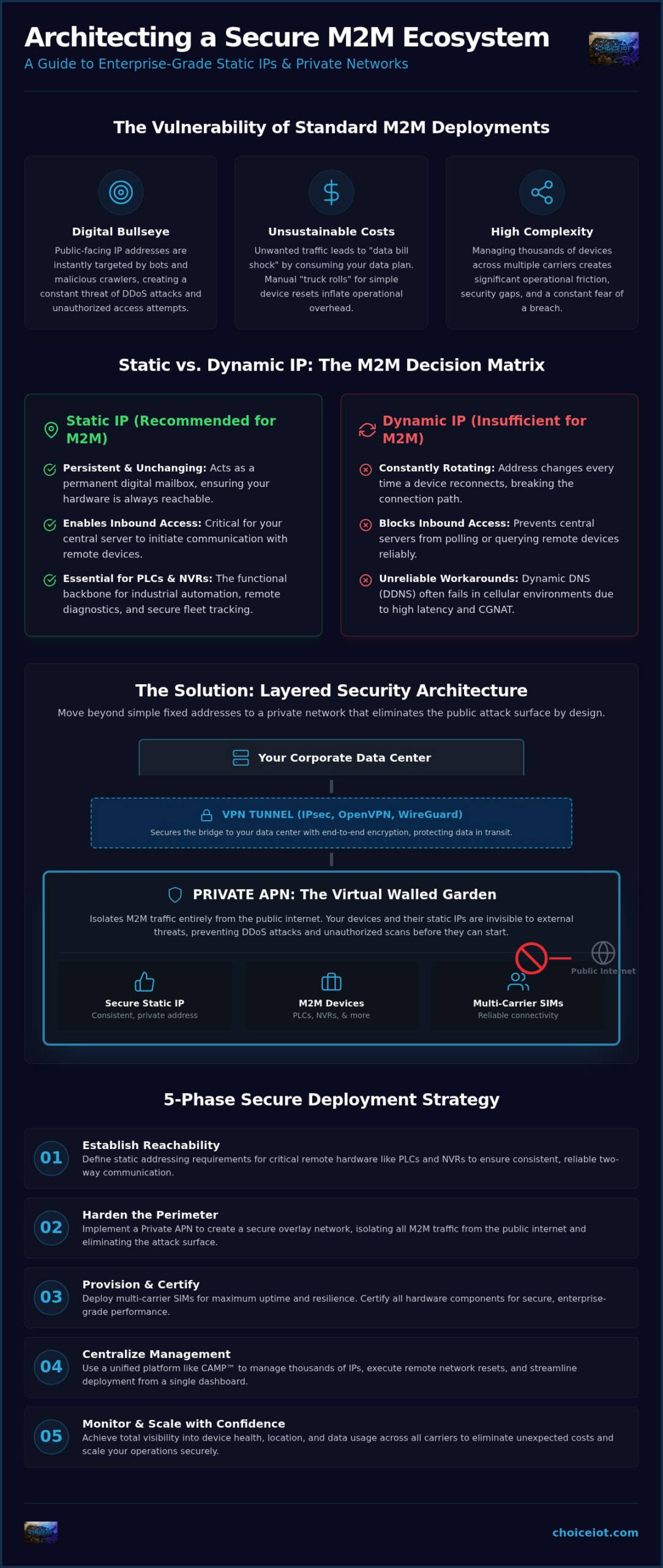
A public-facing IP address is a digital bullseye for DDoS attacks. For enterprise deployments, the traditional approach to connectivity often feels like a trade-off between accessibility and security. It’s a risk you can’t afford. You know the pain of managing thousands of devices across multiple carriers. The complexity is high. The fear of a breach is real. The cost of manual “truck rolls” for simple device resets is unsustainable.
We agree that your infrastructure should empower growth, not create bottlenecks. This guide teaches you how to architect and manage a secure static ip for m2m to ensure reliable two-way communication and enterprise-grade protection. You’ll learn to isolate traffic from the public internet while maintaining total operational control and reducing overhead through automation.
We’ll explore the strategic deployment of Private APNs, real-time visibility via the CAMP™ platform, and compliance with the EU Cyber Resilience Act’s 2027 requirements. From SIM Lock features to remote network resets, this is your roadmap to a streamlined, secure, and scalable M2M ecosystem. Let’s build a foundation that prioritizes both reach and resistance.
Key Takeaways
- Establish persistent device reachability. Learn why static addressing is critical for accessing remote PLCs and NVRs consistently.
- Harden your perimeter. Isolate devices from the public internet by layering a secure static ip for m2m with a Private APN.
- Streamline deployment. Follow a proven five-phase strategy to provision multi-carrier SIMs and certify hardware for enterprise use.
- Reduce operational friction. Use the CAMP™ platform to manage thousands of IPs and execute remote network resets from a single dashboard.
- Scale with confidence. Achieve total visibility into device health and data usage across all carriers to eliminate unexpected costs.
What is a Secure Static IP for M2M and Why Does it Matter?
A static IP is a persistent, unchanging address assigned to a SIM card. It acts as a permanent digital mailbox for your hardware. In the world of Machine to machine (M2M), consistency is everything. Without a fixed address, your central server cannot find a remote device to initiate communication. This capability is known as inbound access. It is the functional backbone of industrial automation, remote diagnostics, and secure fleet tracking.
Standard cellular connections typically use dynamic IPs. These addresses rotate every time a device reconnects or moves between towers. This works for a smartphone browsing the web, but it fails for a Programmable Logic Controller (PLC) or Network Video Recorder (NVR). If the IP changes, the connection breaks. A secure static ip for m2m solves this by ensuring your hardware is always reachable, regardless of location or uptime.
Static vs. Dynamic IP: The M2M Decision Matrix
Dynamic IPs are insufficient for devices that need to be polled or queried. While some engineers attempt to use Dynamic DNS (DDNS) as a workaround, it often fails in cellular environments. High latency and carrier-grade NAT (CGNAT) prevent DNS records from updating quickly enough to be reliable. For mission-critical infrastructure, the latency of a DNS update is a risk you don’t need to take. You can read more about these differences in our guide on Static IP vs. Dynamic IP: Which is Better for Your IoT Deployment?
The Vulnerability of Standard Public IPs
Assigning a public static IP is like leaving your front door wide open. Automated bots and malicious crawlers target public-facing addresses within minutes of activation. This exposure leads to data bill shock. Unwanted inbound traffic, such as port scans and brute-force attempts, consumes your data plan. Every unauthorized packet costs you money. Security through obscurity is not a strategy. True protection requires isolating your secure static ip for m2m from the public internet entirely, moving beyond simple fixed addresses to private network architectures.
Layering Security: Combining Static IP with Private APN
A static IP alone is an invitation to scan. It provides the reachability you need but lacks the protection your data requires. To achieve a truly secure static ip for m2m, you must layer your addressing within a Private Access Point Name (APN). This architecture creates a virtual walled garden. It isolates your devices from the public internet entirely. Traffic moves through a dedicated pathway within the carrier’s core network, ensuring that your static IPs never appear on public scan lists.
By removing the public route, you effectively eliminate the attack surface. Security experts recommend monitoring and implementing static IPs alongside robust firewall policies to mitigate remote access risks. Integrating a Private APN ensures your static addresses remain invisible to external threats while maintaining two-way communication.
How Private APNs Isolate M2M Traffic
In a standard deployment, devices share a public gateway. In a Private APN environment, your traffic stays within the carrier’s internal infrastructure. It never touches the open web. This physical and logical separation is preferred for HIPAA, PCI, or SOC2 compliance because it prevents unauthorized external access by design. It also stops DDoS attacks before they reach your hardware. Without a public IP to target, malicious actors cannot flood your devices with traffic or trigger the data bill shock discussed earlier. For a comprehensive look at how this architecture protects enterprise fleets, see our private APN for IoT 2026 guide to secure connectivity.
The Role of VPNs in Secure Static IP Architectures
While the Private APN secures the cellular path, a Virtual Private Network (VPN) secures the bridge to your data center. You can choose from several protocols based on your hardware capabilities. IPsec is the enterprise standard for site-to-site connectivity. OpenVPN offers flexibility for various operating systems. WireGuard provides a modern, high-performance alternative with leaner code. An IPsec VPN establishes a secure, encrypted tunnel over cellular networks to protect data in transit between the M2M device and your corporate infrastructure. This ensures end-to-end encryption, keeping your secure static ip for m2m deployment compliant and resilient against interception.
5 Steps to Implement a Secure Static IP Deployment
Moving from a conceptual architecture to a live deployment requires precision. A successful secure static ip for m2m rollout balances hardware compatibility with rigorous network logic. Execution is everything. Follow these five phases to ensure your devices are reachable, protected, and manageable at scale.
Step 1 & 2: Preparing Your Connectivity Foundation
Success starts with hardware. Your router or gateway must support custom APN settings to bypass the public internet. Before purchasing hardware, verify carrier device certification. Uncertified devices often face frequent connectivity drops or authentication failures on enterprise networks. Once hardware is vetted, work with Choice IoT to provision your SIMs. You must request the correct IP pool. Private static IPs are the gold standard for security, while public static IPs should only be used when a private APN for IoT is not feasible. For deployments spanning multiple regions, ensure you are using Multi-Carrier IoT SIM cards to maintain redundancy and consistent addressing across different network providers.
Phase 3 focuses on configuration. Set up your secure VPN tunnel and define strict firewall rules on the edge device. Only allow traffic from known, whitelisted source IPs. This prevents unauthorized actors from even attempting a handshake with your hardware.
Step 4 & 5: Hardening and Testing
Security doesn’t end at the network layer. Use the CAMP™ platform to implement security hardening. Enable SIM Lock to tether each SIM to a specific device IMEI. This prevents a SIM from being stolen and used in an unauthorized modem. Set up Device Change Alerts to receive real-time notifications of hardware tampering. Finally, validate the deployment through a structured testing protocol. To verify that your Private APN is correctly routing traffic, follow these steps:
- Check the device status in the CAMP™ dashboard to confirm it has pulled an IP from your assigned private pool.
- Initiate an inbound ping or connection request from within your corporate VPN tunnel.
- Attempt a connection from a standard public internet connection. This request must fail.
- Perform a port scan to ensure only the necessary ports (e.g., for PLC or NVR access) are responsive.
If a device fails to respond during testing, use the Remote Network Reset feature in CAMP™ to re-establish the session without a site visit. This eliminates the need for expensive truck rolls during the validation phase. Ready to secure your fleet? Consult with our technical team to architect your private network today.
Operational Control: Managing Secure M2M at Scale with CAMP™
Provisioning is only the first step. The true challenge lies in “Day 2” operations. Managing thousands of devices across diverse geographic regions and multiple carriers is a logistical hurdle. You need more than just connectivity. You need total control. Scattered spreadsheets and fragmented carrier portals are recipes for failure. A secure static ip for m2m deployment requires a single pane of glass to maintain visibility and security.
The CAMP™ platform centralizes your entire fleet. It provides a unified dashboard for all multi-carrier static IP management. This centralization eliminates the friction of toggling between different carrier systems. It transforms complex infrastructure into a manageable asset. High performance. Streamlined simplicity. Complete oversight.
Real-Time Visibility and Diagnostics
Visibility is the enemy of downtime. CAMP™ provides live session data for every static IP in your fleet. You can monitor signal strength, data consumption, and connection status in real time. If a device goes offline, built-in diagnostic tools help you identify the root cause immediately. Troubleshooting happens in minutes, not hours. For a deeper look at managing these endpoints, see our Real-Time IoT Device Monitoring: A Strategic Guide.
Reducing Operational Costs with Automation
Automation is the key to scalability. Our Remote Network Reset feature is a primary cost-saver. It allows you to re-establish a device’s network session remotely, effectively fixing connectivity issues without a truck roll. No site visits. No expensive technician fees. Higher deployment uptime.
Security must also be automated to be effective. The SIM Lock feature prevents unauthorized usage by tethering each SIM to a specific hardware IMEI. If a SIM is stolen, it becomes useless. This binds your secure static ip for m2m to the intended hardware, preventing data theft and unauthorized network access. To further protect your bottom line, set up automated usage alerts. These intelligent triggers notify you when data consumption hits specific thresholds. You prevent bill shock before it happens. You maintain cost control while your network grows. Efficiency isn’t just a goal; it’s the foundation of your M2M strategy.
Future-Proof Your M2M Infrastructure
Connectivity is no longer just about being online. It’s about being reachable and resilient. A secure static ip for m2m is the cornerstone of this strategy. By combining fixed addressing with Private APN isolation, you eliminate the public attack surface. You stop DDoS threats and data bill shock before they impact your bottom line. You gain the ability to query remote hardware while keeping it invisible to unauthorized scanners.
Operational control shouldn’t be a luxury. The CAMP™ platform gives you 100% oversight of your multi-carrier deployments from a single dashboard. Features like enterprise-grade SIM Lock and Remote Network Reset ensure your hardware stays secure and functional. No more unnecessary truck rolls. No more logistical stress. You have the tools to manage thousands of endpoints with streamlined simplicity. It’s about total visibility and rapid response.
Partner with Choice IoT for Secure M2M Connectivity to gain total control over your digital perimeter. Our platform and private network features provide the transparency and automation your enterprise demands. Build on a foundation of reliability. Scale with confidence. Your infrastructure is ready for the next level.
Frequently Asked Questions
Is a static IP more expensive than a dynamic IP for M2M?
Static IPs typically carry a higher monthly cost than dynamic addresses because they consume a dedicated network resource. However, the total cost of ownership is often lower. Dynamic IPs frequently lead to “truck rolls” or manual resets when connectivity fails. By using a secure static ip for m2m, you eliminate these logistical expenses. The investment provides predictable reachability and reduces long-term operational overhead for large-scale enterprise deployments.
Can I use a secure static IP with any cellular carrier?
Most major carriers offer static addressing, but the provisioning process and management tools differ significantly between providers. Attempting to manage multiple carrier-specific portals for static IPs creates massive administrative friction. Choice IoT simplifies this by offering a unified management layer. You can deploy and monitor static IPs across various carrier networks using the CAMP™ platform, ensuring consistent performance without the complexity of juggling multiple accounts.
What is the difference between a public static IP and a private static IP?
A public static IP is visible to the entire internet, making it a target for automated port scans and DDoS attacks. Conversely, a private static IP resides within a Private APN. It is only reachable through a secure VPN tunnel or a dedicated network bridge. Choosing a private address is essential for maintaining a secure static ip for m2m architecture, as it effectively hides your hardware from external threats and malicious actors.
Do I need a special router to use a static IP for M2M?
You must use industrial-grade hardware that supports custom APN configuration. Many consumer-grade modems lack the firmware required to communicate with a Private APN or assign a specific static address. For a secure deployment, select a gateway that also supports IPsec or OpenVPN. This allows you to encrypt the data moving to and from your static address, providing a complete end-to-end security solution for your remote M2M hardware.
How does a Private APN enhance static IP security?
A Private APN enhances security by creating a logical separation from the public web. It acts as a virtual walled garden. Even though your device has a fixed address, that address is not routable from the open internet. This architecture prevents unauthorized inbound traffic from consuming your data plan. It ensures that only your corporate servers, connected via a secure tunnel, can communicate with the remote hardware.
What happens if my M2M device with a static IP gets stolen?
If a device is stolen, the SIM Lock feature within the CAMP™ platform provides an immediate defense. This feature tethers the SIM card to the specific IMEI of your authorized hardware. If a thief moves the SIM to another modem, the connection is instantly severed. You can also trigger a remote network reset or deactivate the SIM entirely through your dashboard, ensuring your static IP cannot be used for unauthorized data consumption.